
roberta28148131
Participant
November 18, 2019
Question

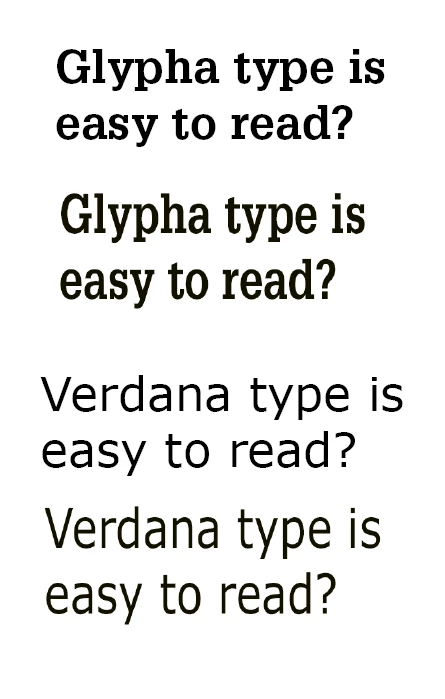
Fonts are streched in Photoshop

  • November 18, 2019
  • 3 replies
  • 797 views

I can not figure this one out? In Photoshop my fonts are streched in hight. It is not only on the screen, it looks the same when i save a image with text. First i thought it might bee some problem with resolution but when I try the same font in Indesign it look all ok? Very troubeling. Picture: Two examples of same text with differnet types, first Indesign second Photoshop. I am running Windows 10 enterprise 64 bit, Indesign 13.1.1 Photoshop 19.1.9
This topic has been closed for replies.

3 replies

melissapiccone
Community Expert
Community Expert
November 18, 2019

all of the above and make sure you don't have anything set in your character panel...

Melissa Piccone | Adobe Trainer | Online Courses Author | Fine Artist
roberta28148131
Participant
November 19, 2019

Thank you this is what I have. I see nothing strange?


BenCKJones
Participant
August 10, 2020

Hi, did you find a solution to this? I'm having the same issue. 

Inspiring
November 18, 2019

Reset your preferences

roberta28148131
Participant
November 19, 2019

I will look in to that, I am however not admin on my computer so I have to check with my IT-unit. 

PECourtejoie
Community Expert
Community Expert
November 18, 2019

Hello, I would reset the text tool in the flyout menu of the character panel>

roberta28148131
Participant
November 19, 2019

Thanks, I tried, but it did not help.