

Fonts out of Alphabetical order
A client just sent me a brochure of their company and they need me to do a few 15sec slide show presentations. One of the key ellements they want me to carry over is the font. Their marketing designer(? the guy who designed their logo, brochures, and cards) Isn't available to send me the fonts. So, of course when I open the brochure project file, it can't find the fonts. Luckily it's a standard free font called Futura. I downloaded and installed the set of Futura fonts, but I'm running into two problems.
1st: The fonts are coming up with different names than theyre file name. (Futura Heavy.ttf is listed as Futura Hv BT Heavy) So of course, the project still doesn't recognize them,
2nd: the Futura Fonts are out of order in the font list in Photoshop and mixed with "G" labeled fonts.
All in all, I was able to I was able to create a new text layer and then manually select the correspond text (Futura Heavy) and it matches up fine for the most part*. But that means I have to do the same with all the other text fields. And when I try to do it for an existing text field, the font is the same, but any property parameters are reset to the fonts default.
Does anyone know why my Futura fonts are out of order?
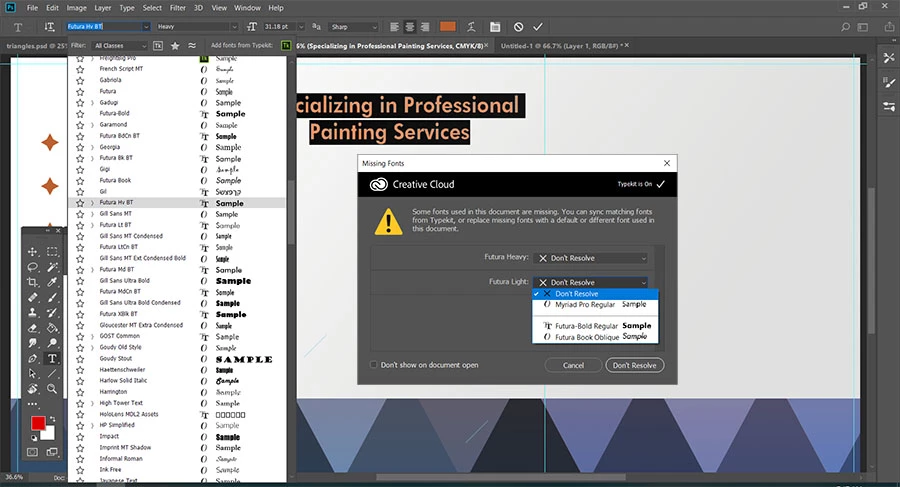
*So, the font matches up for the most part, but there seems to be custom parameters for the text options. Is there a quick way to adjust these to make another layer?
 AdChoices