
Participant
February 4, 2020
Answered

Forms (Arrows) in Photoshop 2020 missing

  • February 4, 2020
  • 2 replies
  • 3333 views

I have had the following problem since the last update: I always had arrows and so on with the forms. There are now only wild animals, boats and flowers to be found. What do I have to do to get the old forms back? (Arrows etc.)
This topic has been closed for replies.
Correct answer

Hi

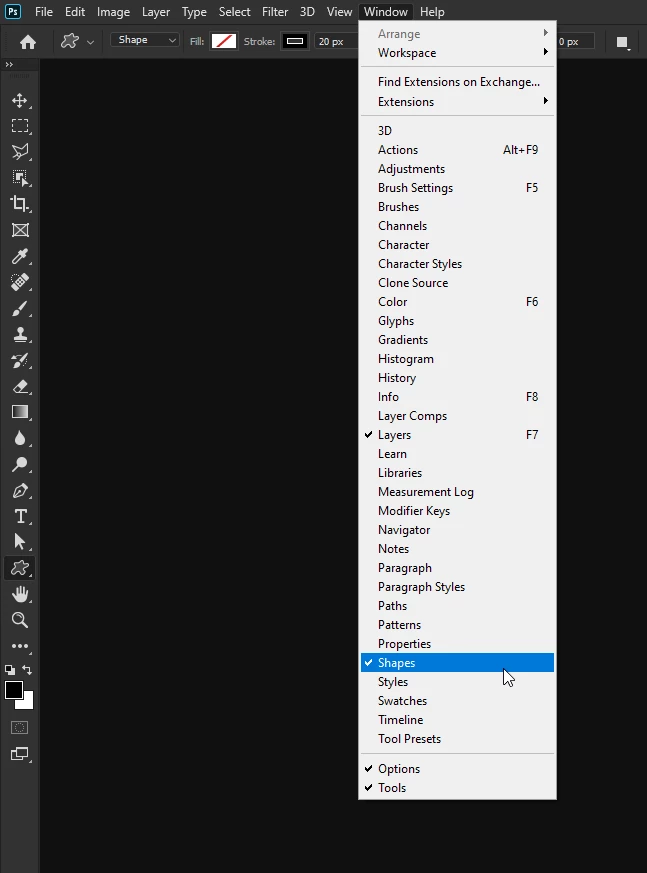
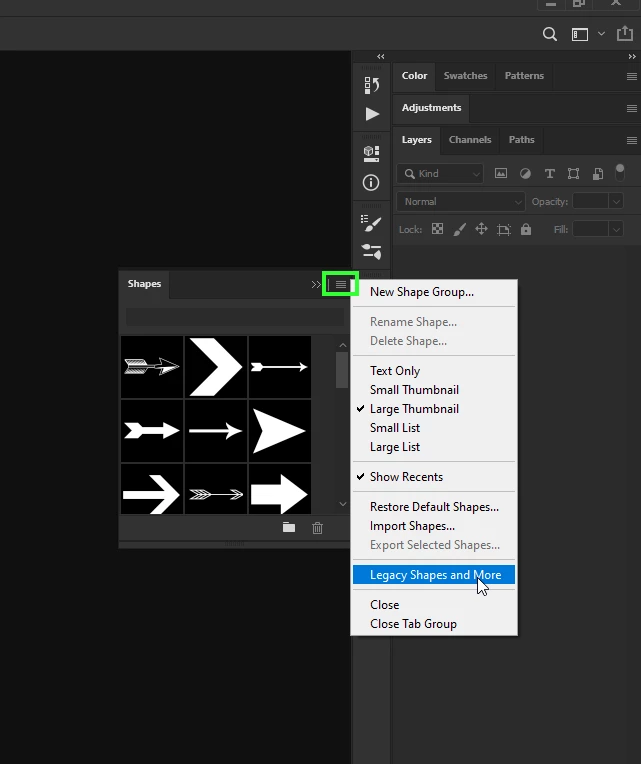
Go to Window > Shapes, click on the flyout menu icon and select Legacy Shapes and More

2 replies

c.pfaffenbichler
Community Expert
Community Expert
February 4, 2020

Funny, »Arrows.csh« does not seem to be in the Photoshop CC 2020 Folder, but you should be able to load it from the Photoshop CC 2019 Folder for example. 

Correct answer
February 4, 2020

Hi

Go to Window > Shapes, click on the flyout menu icon and select Legacy Shapes and More

MoriisAuthor
Participant
February 4, 2020

Thank you. That helps me 100%.