Inspiring
February 24, 2024
Answered

formula lines position

  • February 24, 2024
  • 2 replies
  • 511 views

I've been thinking about how to do this for a few days, what formula to use, I can't find a solution, my question is this, let's take an example: I have a 6000px document and I have 3 or more vertical lines, what could be the formula that positions them across the entire width of the document? I'll give an example if the document is 6000px divided by 3 it comes out 2000px then automatically the lines I created will move the first to 2000px the second to 4000px the third to 6000px, second example: if there are 4 lines, the first line is positioned at 1500px, the second at 3000px, the third at 4500px, the fourth at 6000px. I hope someone has a formula for this.
This topic has been closed for replies.
Correct answer Stephen Marsh

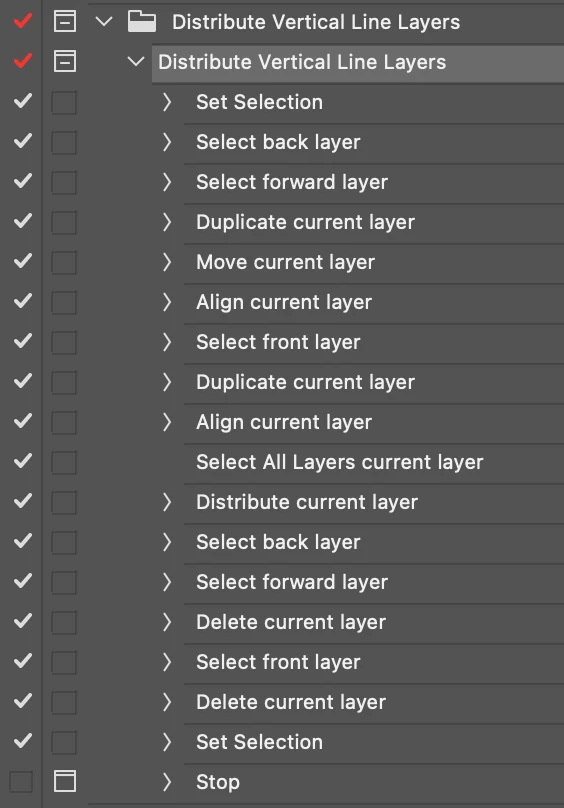
You can take a look at this action, which should work for any quantity of vertical lines. You can convert it to batchPlay UXP code if you like, but there are of course going to be more efficient ways of scripting this than directly converting an action.


https://www.dropbox.com/scl/fi/iwqvtzorf7qvopphzlq16/Distribute-Vertical-Line-Layers.atn?rlkey=xf713mm8qexysmno51fsrl2yn&dl=0


2 replies

Stephen Marsh
Community Expert
Stephen MarshCommunity ExpertCorrect answer
Community Expert
February 24, 2024

You can take a look at this action, which should work for any quantity of vertical lines. You can convert it to batchPlay UXP code if you like, but there are of course going to be more efficient ways of scripting this than directly converting an action.


https://www.dropbox.com/scl/fi/iwqvtzorf7qvopphzlq16/Distribute-Vertical-Line-Layers.atn?rlkey=xf713mm8qexysmno51fsrl2yn&dl=0


Inspiring
February 24, 2024

Stephen I'm not at home When I get back I'll try your method. you are always kind Thank you

Stephen Marsh
Community Expert
Community Expert
February 24, 2024

Please upload a couple of sample PSD mockups or at least a screenshot of the main document window with the layers panel and properties panel visible with one of the line layers selected.

Inspiring
February 24, 2024

This is what I would like to do

before

afret


link psd

https://www.mediafire.com/file/wr5s1dtflwmhjrs/psd.zip/file 


Stephen Marsh
Community Expert
Community Expert
February 24, 2024

Is that sample file truly representative of the working files?


A flattened Background layer with vector line tool path layers?


That's it, no other layers, or groups or artboards etc?


If so, what is the expected start point for automation? Such as first manually selecting all line layers? Or are no layers selected or only the Background layer selected and not the lines?


P.S. How are the lines first created, do you have control over this? For example, could 5 lines be created if you need 3 (two extra temporary "helper" lines)