

Ivan Zajats
Inspiring
July 15, 2023
Question

Frequency separation action (problem)

  • July 15, 2023
  • 3 replies
  • 1161 views

Hi, people! I've noticed a "bug" in my recent FS actions.

Usually, I use FS once per image, but sometimes I need to use it again for another area with another amount of blur. That's when the problem occurs - the second time it damages the image (makes a bit blurry).


I didn't touch the mouse while recording, every manipulation was done from the keyboard.

But I still think, it's the layers naming issue. When the Apply image command is perfomed second time, it probably chooses the wrong layer. How to avoid it? Can anybody kindly check my actions and rewrite them? So that they become workable unlimited number of times in every document without any problems. Or just explain my mistake (I really want to understand it).

https://drive.google.com/file/d/13l2Qqn7Ub0VjaKMwlplR077V6kVAETSz/view?usp=drive_link


I just ask to preserve the naming and layer structure (play it once and you'll see what I need)
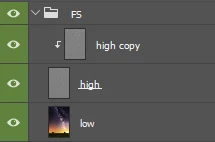
Median, 10 pix by default, group FS marked green


By the way, if I rename the layers in the first FS group, next time it works fine. 🙂

Should I do it manually each time?

This topic has been closed for replies.

3 replies

Ivan Zajats
Inspiring
July 18, 2023

up

Jqqerry
Inspiring
July 18, 2023

If you're working in an 8-bit environment and you're applying FS repeatedly, you're going to lose a little bit of detail, regardless of what kind of blur you're doing. That's the difference between 8-bit and 16-bit, the loss of detail.
If you want to avoid that, change one layer to a SmartObject and click on it to change the mode to 16-bit in the newly opened psb and then work with FS.
Then press Ctrl+S to save.
Then you can use it 100 times instead of 10 and not lose any detail.

Ivan Zajats
Inspiring
July 18, 2023

@Jqqerry , @Stephen Marsh Have you tested my actions? it doesn't matter how many bits, they just mess up the layers... it's the naming problem as I mentioned, not the "math"

Stephen Marsh
Community Expert
Community Expert
July 15, 2023

@Ivan Zajats 


For now, the best that I can do is to recommend working in 16 bpc mode as per my action here:


https://www.dropbox.com/s/vhoal39t9ygl6tt/Frequency%20Splitter%20v4%20Conditional.atn?dl=0


Ivan Zajats
Inspiring
July 15, 2023

Gaussian blur? rubbish... I had my old actions with Gaussian and just removed them

Median is much better for preserving the contrast edges, you should now that


p.s. yours have the same problem as mine 🙂 

Stephen Marsh
Community Expert
Community Expert
July 18, 2023

I often work in 8, why should I apply 16-bit action? I guess, I've tested both and deleted immediately. It's a bit funny, you claim to be good at scripting, but can't find & explain my mistake in a simple action... and/or suggest yours which meets my criteria, though it could be recorded in a few minutes.


For FS 16 bpc is mathematically lossless.


8 bpc FS Is usually "visually lossless" but in some cases it is visually lossy.

Ivan Zajats
Inspiring
July 15, 2023

@Stephen Marsh, if you are not too busy with the scripting, you're welcome 🙂