Known Participant
October 8, 2023
Question

Frequency Separation Error

  • October 8, 2023
  • 2 replies
  • 709 views

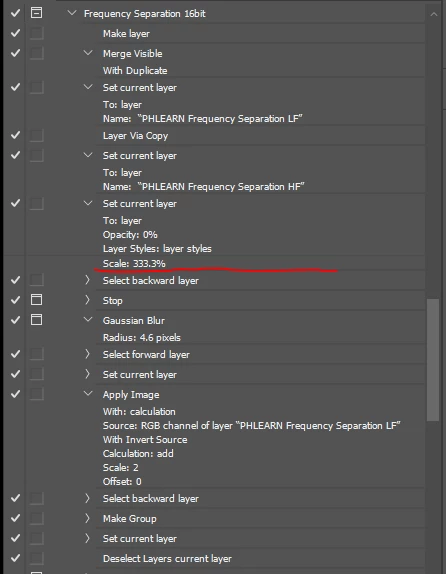
A simple Frequency Separation action, but I see a scale parameter in the Layer Style section, can anyone help me explain this?

The above action is from Phlearn. If I create my own action, there is no scale layer style part


This topic has been closed for replies.

2 replies

Earth Oliver
Legend
October 8, 2023

it's probably just a mistake that they missed. What happens when you disable the step? Does the action still work?

Known Participant
October 12, 2023

Can you help me know what the scale parameter in set layer means?

Legend
October 13, 2023

No, we can't. You need to post screenshots as requested. otherwise we have no idea.

c.pfaffenbichler
Community Expert
Community Expert
October 8, 2023

Please insert a stop in the action after that step and a post screenshot with the pertinent Panels (Toolbar, Layers, History, Properties, Options Bar, …) visible – what does the History Panel indicate? 

Does the active Layer have any Layer Style applied? 

Known Participant
October 8, 2023

This is Phlearn action, if i create same action, action panel not show "scale 333,33%", plz help me bro


https://drive.google.com/file/d/1oeF4bM8mLbKkdOesaOR8-4dUBvBz4F5t/view

c.pfaffenbichler
Community Expert
Community Expert
October 9, 2023

I asked for screenshots. 

Please post screenshots on this Forum directly, not links. 


What is the problem with that step exacty? Does an error occur? 

Have you tried replacing it with a newly recorded step?