Inspiring
June 7, 2021
Answered

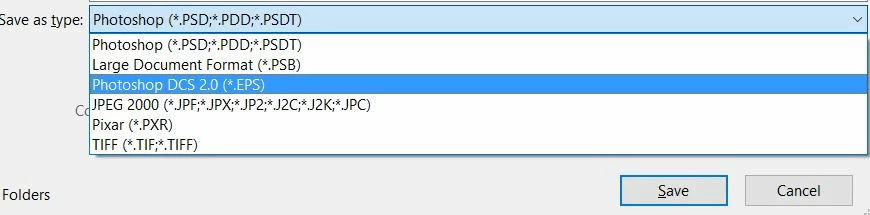
Full list of save options no longer appears

  • June 7, 2021
  • 1 reply
  • 929 views

I am trying to save a tiff file as an ordinary JPG, but the full list of file types no longer appears.  What do I do?
This topic has been closed for replies.
Correct answer D Fosse

"Save As" now lists only the formats that support all the current properties of the file. All other formats, with limited support, are now moved to "Save A Copy".

This had to be changed because Apple removed the API that allowed Photoshop to strip "-copy" from the filename. With the new API, Photoshop is forced to finalize the filename before entering the Save dialog. That filename has to contain "-copy", because it is a copy. If it wasn't a copy, your original file would have to be overwritten as a flat 8 bit file to satisfy the jpeg specification.

To be clear, the old Save function is no longer possible. This is not a bug or mistake, but a deliberate security policy from Apple.


Platform parity has always been important in Photoshop, for the sake of actions, plugins, tutorials and so on. So it had to be changed in the Windows version as well, even though it never was a problem on Windows. But it may well be in the future, if Microsoft adopts the same policy.

1 reply

D Fosse
Community Expert
D FosseCommunity ExpertCorrect answer
Community Expert
June 7, 2021

"Save As" now lists only the formats that support all the current properties of the file. All other formats, with limited support, are now moved to "Save A Copy".

This had to be changed because Apple removed the API that allowed Photoshop to strip "-copy" from the filename. With the new API, Photoshop is forced to finalize the filename before entering the Save dialog. That filename has to contain "-copy", because it is a copy. If it wasn't a copy, your original file would have to be overwritten as a flat 8 bit file to satisfy the jpeg specification.

To be clear, the old Save function is no longer possible. This is not a bug or mistake, but a deliberate security policy from Apple.


Platform parity has always been important in Photoshop, for the sake of actions, plugins, tutorials and so on. So it had to be changed in the Windows version as well, even though it never was a problem on Windows. But it may well be in the future, if Microsoft adopts the same policy.

JJMack
Community Expert
Community Expert
June 7, 2021

Adobe changed Photoshop file menu Save As operation.  Photoshop menu file Save As interface no longer support saving layered documents as Photoshop PDF or image file formats that do not support Photoshop Layers.  To use Photoshop's document saveAs function to save those files you need to other Photoshop interfaces like "Save a Copy" that is a new menu File "Save a Copy" interface.  Old Photoshop interfaces like Export  As, Export Save for web and  Photoshop Scripting these interfaces still support  Document saveAs to save those file formats from layered Photoshop documents.   Adobe only removed that support from Photoshop  menu Save AS interface. Adobe also added menu File "Save a  Copy" interface you can use to save those files.  So use the interface that works best in your new Photoshop work flow.

JJMack