
oliviermorisse
Participant
September 25, 2020
Answered

Full screen mode doesn't work

  • September 25, 2020
  • 2 replies
  • 2219 views

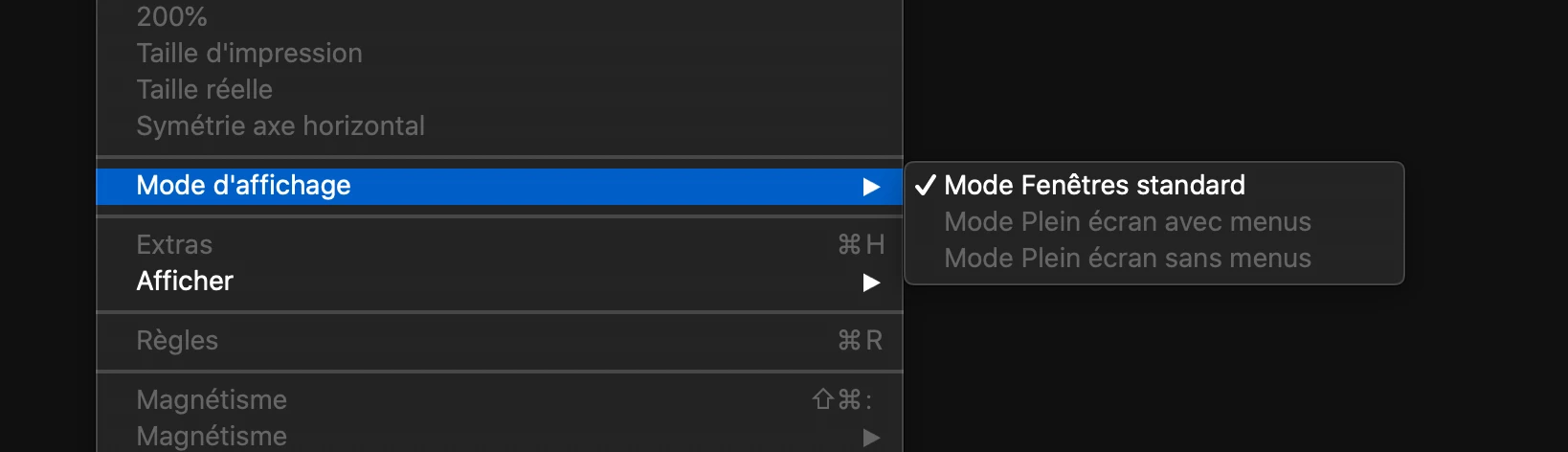
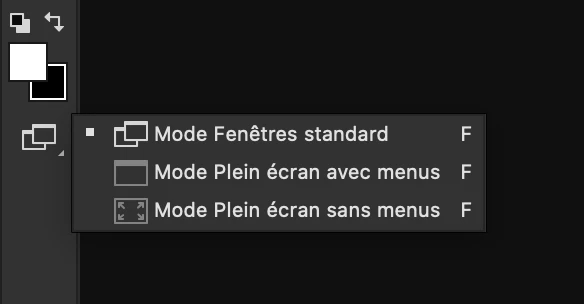
Hi, I'd like to dedicate one entire space for Photoshop but unfortunatly it seems to be impossible for me to go to full screen mode (with menu) on my Mac and I can't figure out why. Options stay grey in the menu and in the tool bar. Ps is uptodate and I run Catalina 10.15.6 with a Dell 32". Every other app fit perfectly except Ps. If someone has a simple answer…


This topic has been closed for replies.
Correct answer Jeff Arola

You need to open an image first before you can change out of Standard Screen Mode.

2 replies

MarekMularczyk
Community Expert
Community Expert
September 25, 2020

So when you press "F" twice, nothing happens?

Do you have any images open?

Adobe Community ExpertAdobe Certified Professional
Jeff Arola
Community Expert
Jeff ArolaCommunity ExpertCorrect answer
Community Expert
September 25, 2020

You need to open an image first before you can change out of Standard Screen Mode.

oliviermorisse
Participant
September 26, 2020

Hey Jeff,

Thanks for the tip, you nailed it. Still don't know why I didn't try that before.

In fact, it's kind of weird that you can access standard mode without any file opened but not the other modes.

When you close a file in full screen mode (with or without menu) Ps gets back in standard mode.

Not getting any sense for me while I just wanted to dedicate one space for Ps, but hey…

Anyway, thanks a lot !