
December 3, 2019
Question

Function Graphs in Adobe PS

  • December 3, 2019
  • 4 replies
  • 1765 views

Hi everyone


I'm a total newbie in PS and don't even know if this is is possible: I want to draw a simple mathematical function of a sinus (right part of the image). I'm looking for the wave and the two axis with the labels.
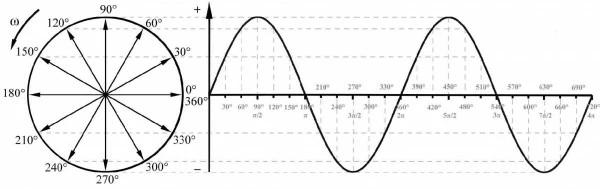


The "wave" distortion in the filter menu does something like it but is not very accuarte. For example I cant choose where excatly the line starts. Can u help me with this? I'm looking for an accurate way to do this (don't want to use some crappy math apps because I want to desing something and use my own fonts). The best would be an add on for PS but I didn't find something which does the job.

As a newbie I can't imagine that this isn't possible. hElPPPppP!


Thank you for the help,

m.

This topic has been closed for replies.

4 replies

Legend
December 4, 2019

Have you tried using Google? Search for "postscript sine wave."

Legend
December 3, 2019

Use the math apps to do the math. Get a graphic. Pretty it up in Photoshop. 

Chuck Uebele
Community Expert
Community Expert
December 3, 2019

I would fake it also, as semaphoric said. Import you graphic and either redraw it with the pen tool or edit out the text and put new next in.

Semaphoric
Community Expert
Community Expert
December 3, 2019

I don't know how accurate this is, but you can fake it by setting up a path with the pen, like so:

You can then stroke the path with the Brush tool.

The guides were set up via View > New Guide, with horizontal guides at 10%, 50%, and 90%, and vertical guides every 12.5%. You could set up similar guides at the appropiate locations, and then make paths along them, stroked with a dashed line.