
Stephen Marsh
Community Expert
Community Expert
December 20, 2022
Answered

Function to Restore Original Channel Visibility

  • December 20, 2022
  • 1 reply
  • 505 views

Does anyone have a function to restore the original channel visibility?


The idea is to have something similar to the standard DOM feature:


// Set the active channels
var savedChannelState = activeDocument.activeChannels;

// Do stuff that changes the original active/selected channels

// Reset the saved active channels
activeDocument.activeChannels = savedChannelState;


However, rather than returning the original active/selected channels, it would restore the original visibility of the various channels (whether component, spot, alpha etc).


Another possible approach would be to not change the existing channel visibility when making the channel active in the for loop... but how?
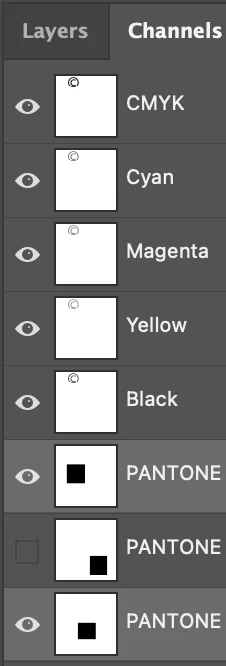


In this example, all channels except one are visible before some "other" script code is run. If the "other" script code in a for loop changes the visibility, I'd like to reset it to what it was before the "other" code was run.


I was expecting to find an existing function for this as it would appear to be a common enough task, however, I haven't had any luck and have had no joy in trying to hack something together myself.


Can somebody please help?


This topic has been closed for replies.
Correct answer Mike Bro

Hello @Stephen Marsh,


The function seems to be working for me when I test it with some channel's turned off to start.

    function myActiveChannelNames(){
        var myActiveChannels = [];
        var myChannels = activeDocument.channels;
         for (var i = 0; i < myChannels.length; i++){
          if (myChannels[i].visible == true) {   
            myActiveChannels.push(myChannels[i].name);
      
          }
       }
          return myActiveChannels;
      }

      var myChannels = myActiveChannelNames();

// Do stuff that changes the original active/selected channels

activeDocument.channels["Magenta"].visible = false;
activeDocument.channels["Spot Color 1"].visible = false;

   //Return Channel state
    for (var i = 0; i < myChannels.length; i++){  
     var ActiveChannel = myChannels[i]; 
      activeDocument.channels[ActiveChannel].visible = true; 
    }

I can see the above channels turn off and then return back to their original visible state whith the ones that were turned off remain off.


Regards,

Mike

1 reply

Legend
December 20, 2022

Hello @Stephen Marsh,


Give the below script a try....

Note: I only did minimal testing.

    function myActiveChannelNames(){
        var myActiveChannels = [];
        var myChannels = activeDocument.channels;
         for (var i = 0; i < myChannels.length; i++){
          if (myChannels[i].visible == true) {   
            myActiveChannels.push(myChannels[i].name);
      
          }
       }
          return myActiveChannels;
      }

      var myChannels = myActiveChannelNames();


// Do stuff that changes the original active/selected channels


   //Return Channel state
    for (var i = 0; i < myChannels.length; i++){  
     var ActiveChannel = myChannels[i]; 
      activeDocument.channels[ActiveChannel].visible = true; 
    }

Regards,

Mike

Stephen Marsh
Community Expert
Community Expert
December 20, 2022

@Mike Bro – thank you for taking an interest!


Unfortunately, all channels are visible, when I only want the channels that were previously visible to show and the channels that were not visible to stay hidden.


Edit: I am using the following for loop, which makes each channel visible as it is processed:


// For loop from the late Michael_L_Hale
for (var channelIndex = 0; channelIndex < activeDocument.channels.length; channelIndex++) {
    if (activeDocument.channels[channelIndex].kind == "ChannelType.SPOTCOLOR") {
        activeDocument.activeChannels = [activeDocument.channels[channelIndex]];

        // process the Spot Channels

    }
}
Mike BroCorrect answer
Legend
December 20, 2022

Hello @Stephen Marsh,


The function seems to be working for me when I test it with some channel's turned off to start.

    function myActiveChannelNames(){
        var myActiveChannels = [];
        var myChannels = activeDocument.channels;
         for (var i = 0; i < myChannels.length; i++){
          if (myChannels[i].visible == true) {   
            myActiveChannels.push(myChannels[i].name);
      
          }
       }
          return myActiveChannels;
      }

      var myChannels = myActiveChannelNames();

// Do stuff that changes the original active/selected channels

activeDocument.channels["Magenta"].visible = false;
activeDocument.channels["Spot Color 1"].visible = false;

   //Return Channel state
    for (var i = 0; i < myChannels.length; i++){  
     var ActiveChannel = myChannels[i]; 
      activeDocument.channels[ActiveChannel].visible = true; 
    }

I can see the above channels turn off and then return back to their original visible state whith the ones that were turned off remain off.


Regards,

Mike