Inspiring
November 13, 2020
Answered

FX Reflections Images not consolidating

  • November 13, 2020
  • 1 reply
  • 811 views

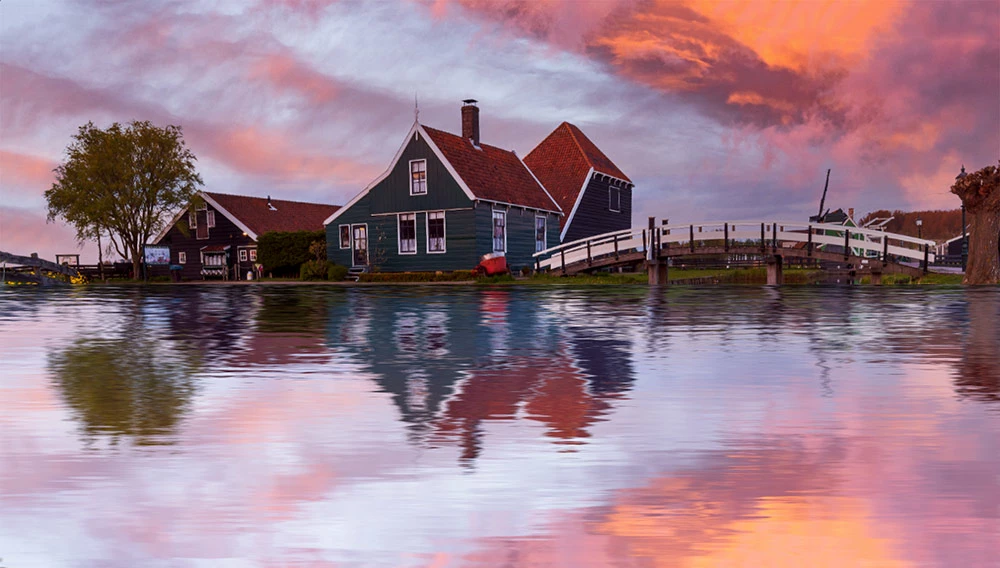
I'm trying to get the sky (replaced with Sky Replacement in PS) to reflect on the water using FX Reflections Action. The last step (Consolidate all here) is not working, hence the reflection is not showing and not complete. I'm using latest version of CC Photoshop and Windows 10.

Any advise or thoughts?

Thanks

This topic has been closed for replies.
Correct answer panosfx426863
Thanks, I already have.

Bojan, thanks for bringing this discussion to my attention.

When the "Water Reflection" action is finished, there are two documents (two different renditions of the reflection effect) open on the user's workarea. They are tiled vertically. Salim apparently right clicked on a document tab, which in return displayed a pop up window with the "Consolidate All to Here" command at the top. This command is not an action step. Nor it affects the layers. From what I see on his screenshot, the action worked as expected.

A recommendation to Salim: you should crop and straighten the photo prior to processing it with the actions. Crop out the pond, leave only the houses and the bridge. Then run the action:

1 reply

JJMack
Community Expert
Community Expert
November 13, 2020

JJMack
Solo444Author
Inspiring
November 13, 2020

Thanks for your response to my post.

I replaced the sky and then used FX Reflections but the action does not give me the reflection as yours.

Did you use the FX action?


JJMack
Community Expert
Community Expert
November 14, 2020

No I manually duped Photoshop's 2021 sky replacment layer and unlinked it from the other layer in the group then flipped the duped layer and layer mask  vertically and the worked on these to create a reflection  of the sky on the water.

JJMack