
Participant
March 14, 2026
Question

Gemini 3 Missing in Photoshop

  • March 14, 2026
  • 3 replies
  • 50 views

Hello,


I have a Creative Cloud Pro plan, but I cannot see all of the partner AI models in Adobe Photoshop 27.0.0 release.


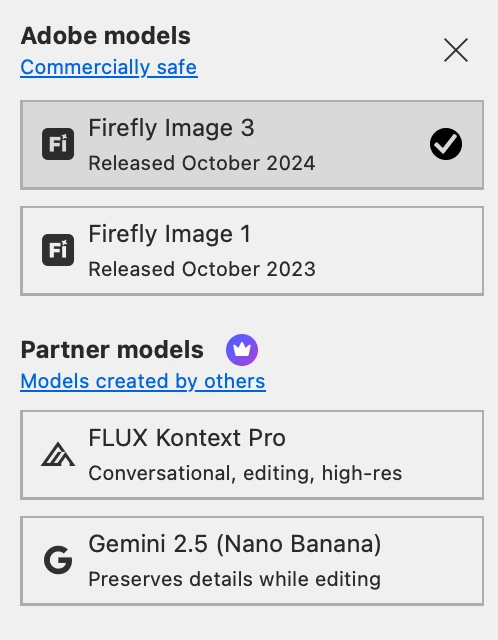
Currently, the only models available in my account are:


  • Firefly Image 3

  • Firefly Image 1

  • FLUX Kontext Pro

  • Gemini 2.5


However, I understand that other partner models such as Gemini 3 should also be available. Could you please explain why these models are not visible in my account and whether they need to be enabled?


    3 replies

    Inspiring
    March 15, 2026

    same here 3pm  nyc  march 15th 2026


    creative explorer
    Community Expert
    Community Expert
    March 15, 2026

    @sinand61512473 what version and OS are you using?

    m
    Participant
    March 15, 2026

    macOS Tahoe Version 26.3.1

    Legend
    March 15, 2026

    27.4.0 is the current version; its Adobe models:


    Larry
    Participant
    March 15, 2026

    27.4.0 is the current version; its Adobe models:


    Version 27.0.0 was the one available to me, but after downloading the 27.5 beta version, I can now see all of the partner AI models in beta. So I guess that was the problem.

    Legend
    March 16, 2026

    Sign Out of Creative Cloud and sign back in.


    I regularly experience issues like: new versions of Adobe apps not displayed; apps continue to be displayed as downloadable even though I’ve installed when notified. PS 27.5 reminded me to install three times, finally marked as Updated after the third install. I sign out/in to CC at least once/month.

    Larry