
Inspiring
February 18, 2024
Answered

Get back CROP tool behaviour from Photoshop CS6

  • February 18, 2024
  • 1 reply
  • 431 views

Hi everyone,


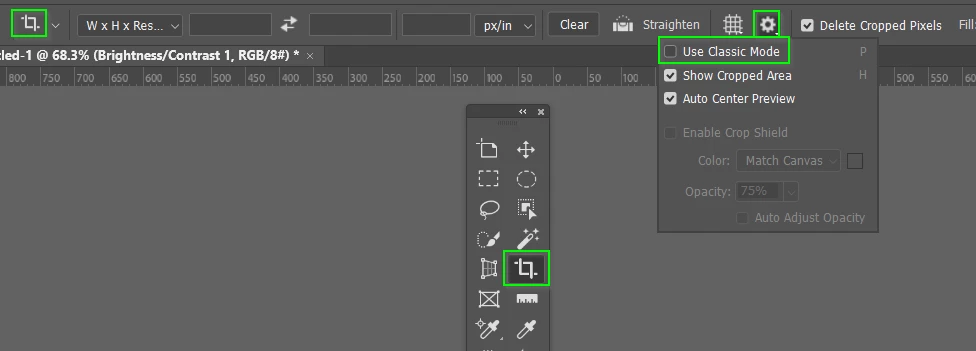
Does anyone know how to get back the CROP tool behaviour that exists in Photoshop CS6 on the latest versions of Photoshop? I find this behaviour convenient to use (though not always!)


1) Selecting CROP tool automatically selects bounds of document


2) Dragging a selection over to a different document, selecting CROP tool automatically selects bounds of selection


3) Both cases press enter to confirm crop bounds, enter again to crop.

EDIT - For 2) I guess I could select Edit- Crop

Thanks in advance guys!
This topic has been closed for replies.
Correct answer Trevor.Dennis

1 reply

Trevor.Dennis
Community Expert
Trevor.DennisCommunity ExpertCorrect answer
Community Expert
February 18, 2024

Inspiring
February 19, 2024

Thanks Trevor.Dennis.


Forgot to mention I normally use 'classic' mode.


Under classic mode, looks like there is no default fit to doc or selection bounds.


I guess I can flip between the default crop mode to get the doc bounds or selection, then use classic to avoid this behaviour when not required.