
sigug
Known Participant
July 28, 2019
Answered

Get pattern style from file?

  • July 28, 2019
  • 1 reply
  • 1772 views

Hi there,

I made a specific pattern style in Photoshop, it's applied to some layer.

Now, with a new computer, I obviously can open that file and the pattern style is there. I also can copy that style to other layers.

But, how can I use that specific pattern style on a new layer? (If I didn't backup the main pattern file from the Windows directory)

Thanks.
    This topic has been closed for replies.
    Correct answer c.pfaffenbichler
    What do you mean by new style?

    In the Styles Panel you can save the Layer Styles applied to the active Layer as a new Style.

    Please post a screenshot including the Layers and Styles Panels.

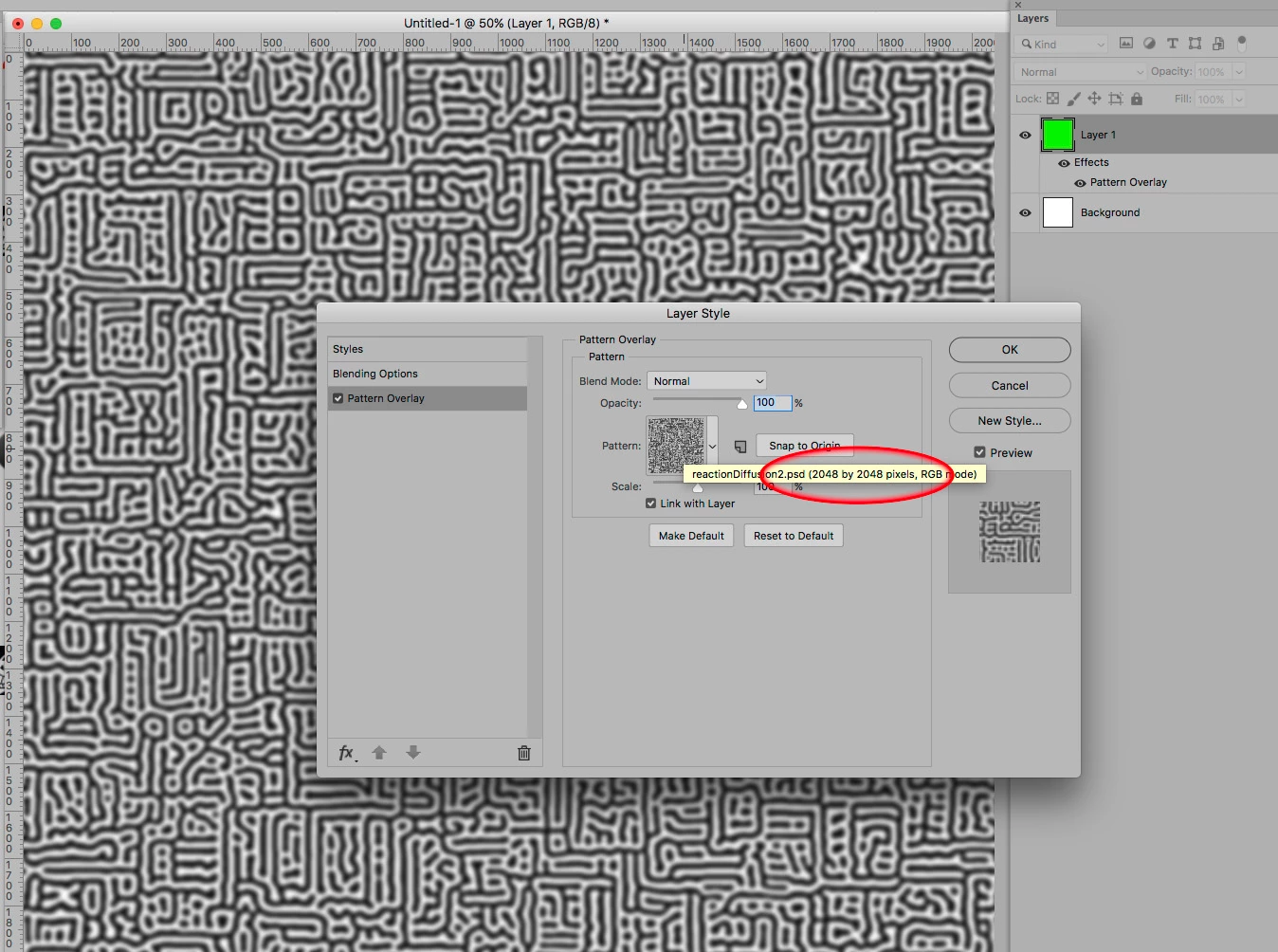
    As for finding the Pattern Swatch’s dimensions:

    I expect there should be ways of extracting the Pattern swatch from the file data itself, but that is beyond me.

    1 reply

    c.pfaffenbichler
    Community Expert
    Community Expert
    July 28, 2019

    Have you tried creating a new Style (Window > Style)?

    Other than that you can extract the pattern from the file manually.

    sigug
    sigugAuthor
    Known Participant
    July 28, 2019

    What do you mean by new style? Yeah, I could create it as a style, but I just want the pattern for the blending options.

    How would I extract that pattern?

    c.pfaffenbichler
    Community Expert
    Community Expert
    July 29, 2019
    I just want the pattern for the blending options.

    What do you mean?

    How would I extract that pattern?

    Apply the pattern to a Layer, set it to 100% size and create a rectangular Selection of the Swatch’s original dimensions (which one can get by hovering over the Pattern in the dialog window) and define a new Pattern.