
Participant
January 7, 2020
Question

Getting used to Photoshop CC

  • January 7, 2020
  • 2 replies
  • 333 views

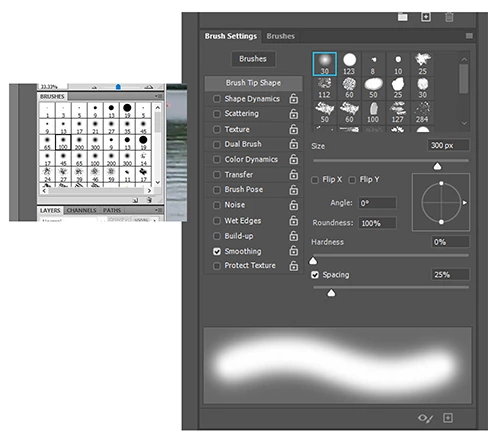
Just moves up from CS4 and I just don't like the HUGE brushes palettes, compared to my old brushes "picker." Is there any way to "collapse" this new palette to just a picker as there was in CS4?
 

Thank you 😉


[Moved from Community Help (which is about the forums) to a better forum... Mod]
[Moving from generic Start/Help forum to the specific Program forum... Mod]
[To find a forum for your program please start at https://community.adobe.com/]

This topic has been closed for replies.

2 replies

Kevin Stohlmeyer
Community Expert
Community Expert
January 7, 2020

Also if you turn the name off, it will look pretty close to what you had before.

Participant
January 8, 2020
I don't know what you mean by turn the name off, and by the way, there
is no Presets Manager

entry when I right click on the other palette.


Thanks, Jim Dodds
jane-e
Community Expert
Community Expert
January 8, 2020

Hi

Go to the panel menu for Brushes and uncheck Brush Name and Brush Stroke if you don't want to see as much information.

Jane


Kevin Stohlmeyer
Community Expert
Community Expert
January 7, 2020

You are looking in the Brush Settings panel.

If you go to the Brushes Panel, you can choose to see the brush tip and not the stroke in the drop down/side menu.

It will look more like this, organized by folders.

Participant
January 8, 2020
Thank you, but perhaps you didn't understand. I would like to just have
a choice

of brush sizes, like on the left in the image, from CS4,

without all the elaboration, and without having to go to a slider,

or a hotkey, which is different now. Just a simple palette of brush
sizes. Sheeesh!