Participant
September 20, 2011
Answered

GIF Format Options

  • September 20, 2011
  • 1 reply
  • 850 views

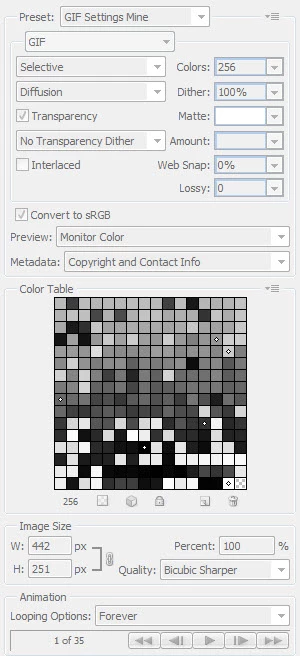
I'm trying to add GIF settings for Save for Web and Devices to a script I have.  It has 2 different areas for FileSaveOptions (shown below).  Can someone please tell me how or where do I tell the script to incorporate each of the settings in the attached example?


self.gifTransparency = true;

self.gifInterlaced = false;

--------------------------------------------------------------------------

case "gif": {

      saveOpts.transparency = toBoolean(fsOpts.gifTransparency);

      saveOpts.interlaced = toBoolean(fsOpts.gifInterlaced);

      saveOpts._convertToIndexed = true;

      saveOpts._flatten = true;

      saveOpts._8Bit = true;

      break;
This topic has been closed for replies.
Correct answer Michael_L_Hale

Yes, you can set lossy with the Object Model.

var gifOptions = new ExportOptionsSaveForWeb();

gifOptions.colorReduction = ColorReductionType.SELECTIVE;// the default  enumeration

gifOptions.PNG8 = true;// needed to force index mode

gifOptions.colors = 256;// the default value

gifOptions.dither = Dither.DIFFUSION;

gifOptions.ditherAmount = 100;// the default value

gifOptions.transparency = true;// default = false

gifOptions.lossy = 10;// default = 0;

Just to be clear, once you have the code from the scriptlistener log you can use that in your script.

1 reply

Inspiring
September 21, 2011

You can not access all of those options using the Object Model. You would have to install and use the scriptlistener plug-in. The options the Object Model's ExportOptionsSaveForWeb doesn't have are convert profile, metadata, and resize.

pltsmtAuthor
Participant
September 21, 2011

Does that mean that I couldn't even set 'lossy' to zero any place in the script?

JJMack
Community Expert
Community Expert
September 21, 2011

pltsmt wrote:

Does that mean that I couldn't even set 'lossy' to zero any place in the script?

No it means you need to have use the scriptlistener plug-in to record some action manager code for a save for web operation with the setting you want to use. You will see some hard coded values in the code with the valuse you used in the dialog.  If you want you can replace these hard coded values with variable and make a function out of the scriptlistener code and use that function in you javascript code.  The plug-in is sort of like the action palette without controls with a stuck record button. Every thing you do in Photoshop that is recordable will be recorded into two files on your desktop one im VBS the other javascript....

JJMack