
Inspiring
November 4, 2023
Answered

Glitch with multiple PSD files on Display

  • November 4, 2023
  • 13 replies
  • 1139 views

Good Day,
Need help. I am encountering a glitch with my PS CC when I have more than one psd files on display at the same time. When I move work on one file, the other file suddenly displays the same file that I am working on at the time.


The problem gets worse when I have 3 or more psd files open, resulting to program crash. This has been very inconvenient and has hampered my productivity big time, making me feel very insecure about it.

What could probably have caused this and what could we do about it? A friend of mine said it could be hardware issue, like a faulty RAM. I am not sure about this.
I do have my adobe CC account installed on two PCs, one is okay and the other has this glitch problem.

Lemme know if anyone else have encountered this issue. Please help

Thank you
This topic has been closed for replies.
Correct answer DavidSaurus

Guys, I may have found a solution!!
https://www.youtube.com/watch?v=XZWxAhYAHlo


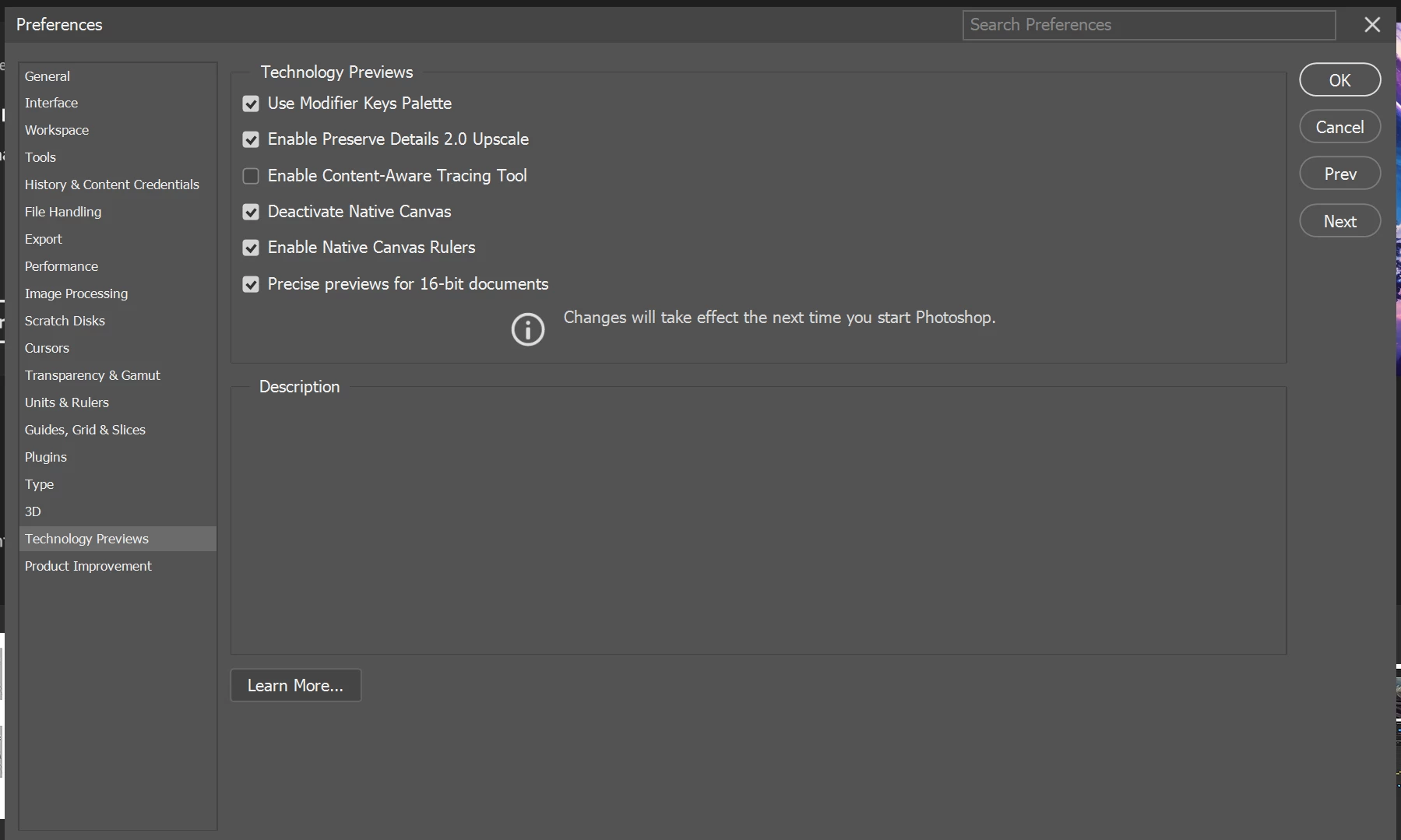
I stumbled upon this clip on youtube. The uploader suggested to open Preferences > Technology Previews > Check the box for "Deactivate Native Canvas", and then restart the program. (The option was unchecked when I first opened it)


Upon restarting, i tried opening up 3-4 files and played around with zoom, hand tool and brush tool. I encountered no glitch whatsoever and the app didn't crashed. IT WORKED!

Will keep observing this though and will update this thread again for anything. Hopefully it doesn't go south again and the problem returns. I have been frustrated and anxious about this error for 2 years now. Hope all goes well.

P.S. Please give love to the guy who uploaded the clip. Like his vid and subscribe to him 🙂

13 replies

Kevin Stohlmeyer
Community Expert
Community Expert
November 8, 2023

@Bojan Živković11378569 is an Expert on this site!

DavidSaurusAuthorCorrect answer
Inspiring
November 8, 2023

Guys, I may have found a solution!!
https://www.youtube.com/watch?v=XZWxAhYAHlo


I stumbled upon this clip on youtube. The uploader suggested to open Preferences > Technology Previews > Check the box for "Deactivate Native Canvas", and then restart the program. (The option was unchecked when I first opened it)


Upon restarting, i tried opening up 3-4 files and played around with zoom, hand tool and brush tool. I encountered no glitch whatsoever and the app didn't crashed. IT WORKED!

Will keep observing this though and will update this thread again for anything. Hopefully it doesn't go south again and the problem returns. I have been frustrated and anxious about this error for 2 years now. Hope all goes well.

P.S. Please give love to the guy who uploaded the clip. Like his vid and subscribe to him 🙂

Inspiring
November 7, 2023

Do you think its possible that maybe a questionable windows 10 license or a faulty installation of the OS could have influenced the glitches that I have on my Adobe Apps? esp Photoshop?


Regarding where I sourced my OS, it looks like it is being runned by a legitimate company here in the Philippines.  


Given the value of our currency here against the west, they provide these windows licenses at an "affordable" price.


Upon installing windows 10 on my PC, I first created a media creation tool installed in a usb and downloaded at the microsoft website. After successful installation, i then bought Windows 10 license from this site a few days after.

D Fosse
Community Expert
Community Expert
November 6, 2023

Erm...a site that calls itself "productkey" and sells "very cheap" is not something I would ever touch....

Inspiring
November 6, 2023

For added context, here are some more info:

- CPU is AMD Ryzen 5600x

- 32 GB RAM (2x16gb) (G Skill Ripjaws V)

- Motherboard is Gigabyte Vision D B550

- Windows 10 purchased on this site (very cheap and seems legit)

https://productkey.ph/?gad=1&gclid=Cj0KCQiAuqKqBhDxARIsAFZELmKxUocJ9yieIuY4a3xnRPNtKGVfwYmggmSUQO0G1jhD5n_avQcyk1oaAoXJEALw_wcB

Other glitches on PC

  1. Errors in After Effects while I was editing multiple clips to edit a timelapse video (squeezing clips duration to 2%)

  1. After Effects display error on the timeline panel 
    3. Screen sometimes flickers to black for a very small fraction of a second. Happens very rarely though. (I tested my monitors on another CPU. They don't flicker)

    Hope these additional details could give a little more clue on what's going on.
Inspiring
November 6, 2023

Hi there,

I updated my RTX 3060 Ti GPU with the latest NVIDIA "studio driver". The glitching is still there.

https://youtu.be/vwhkYX9wpPU


2 files open is manageable, but sometimes crashes

3 files open, easily crashes

Inspiring
November 6, 2023

Hi there,

I updated my RTX 3060 Ti GPU with the latest NVIDIA "studio driver". The glitching is still there.


2 files open is manageable, but sometimes crashes

3 files open, easily crashes

Inspiring
November 5, 2023

Thank you for checking. Will try out your suggestion within the day and will get back to you on what happens next.

D Fosse
Community Expert
Community Expert
November 4, 2023

Ok, can't see any problems there.


But first of all, update the GPU driver from Nvidia's site. Note:

Make sure to download the Studio driver, not the Game Ready driver.

Choose custom install and check "clean install" to remove all traces of the old driver.

Uncheck the extra components in the driver package (GeForce Experience, PhysX). Install only the base driver.

Inspiring
November 4, 2023

Here is also the GPU compatibility check