
Inspiring
November 3, 2021
Answered

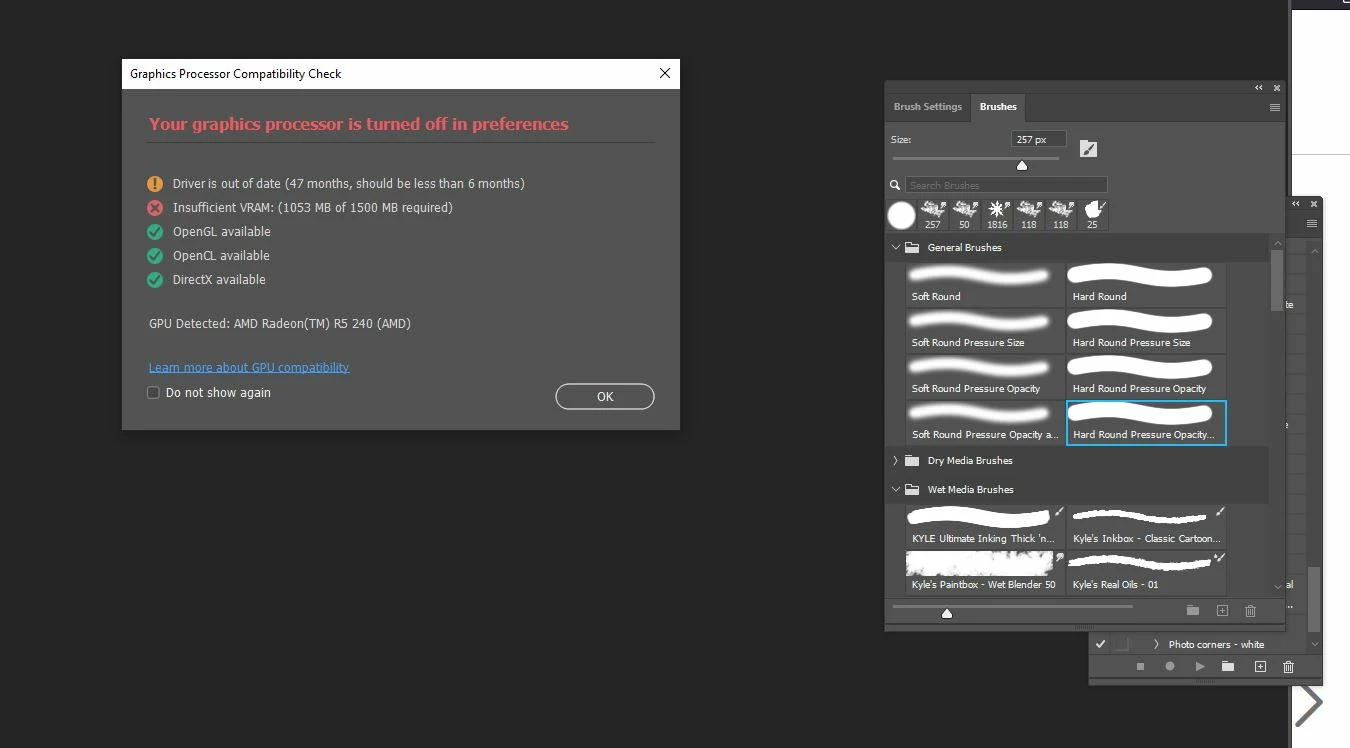
Got this pop up message; what does it mean?

  • November 3, 2021
  • 1 reply
  • 1637 views

I was looking through an old folder on my computer and found an Action that I hadn't used in a while. I double clicked on it and it launched Photoshop. When the program opened, I got a pop up box with a message (see photo).

Do I need to do anything about this? The program seems to be running fine, as usual.

Thank you!
 

This topic has been closed for replies.
Correct answer Nancy OShea

Your Graphics Processor is turned off.

Go To Photoshop Preferences > Performance tab > Graphics Processor Settings.


1 reply

Nancy OShea
Community Expert
Nancy OSheaCommunity ExpertCorrect answer
Community Expert
November 3, 2021

Your Graphics Processor is turned off.

Go To Photoshop Preferences > Performance tab > Graphics Processor Settings.


Nancy O'Shea— Product User & Community Expert
Inspiring
November 3, 2021

It look as if it's not possible for me to turn the Graphics Processor on. Here's a screenshot:


Nancy OShea
Community Expert
Community Expert
November 3, 2021

Please ensure your computer meets or exceeds the minimum system requirements for CPU and GPU.
- https://helpx.adobe.com/photoshop/system-requirements.html
- https://helpx.adobe.com/photoshop/kb/photoshop-cc-gpu-card-faq.html

Nancy O'Shea— Product User & Community Expert