
gomax
Participating Frequently
October 5, 2017
Answered

Grab or drag layer to upward desire layer in same document

  • October 5, 2017
  • 6 replies
  • 1562 views

So here is condition ,Suppose i have a 1000 of layer in document
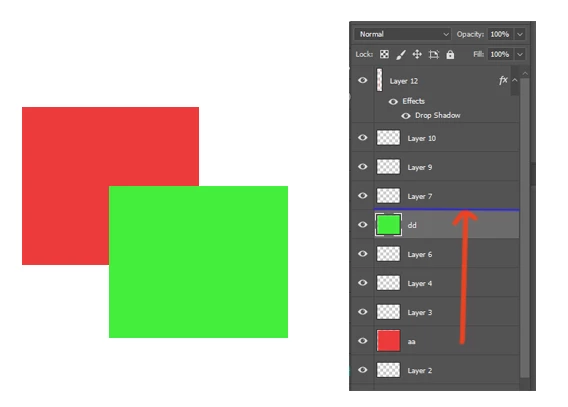
i want to drag aa layer to upward the dd layer ,In image it show simple but if u have 1000 of layer it would difficult to grab or drag layer upward to desire layer.i know there is a shortcut  like ctrl+[  something but it take lots time to drag layer upward to desire layer several time pressing this shortcut because this shortcut not working function like holding ctrl and +[ button and the layer goes automatically upward,if u did not use like this.. experiment yourself ...in my case  this condition occurs several time,if any script or free extension let me know.it will helpful for me and this is my first post in adobe community . i try a lot search forum but i did not find answer ..no one have issue like this strange for me...
This topic has been closed for replies.
Correct answer davescm

c.pfaffenbichler  wrote

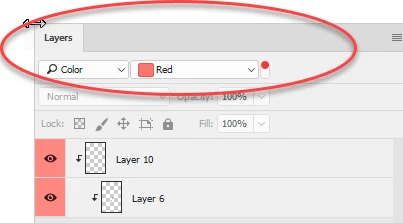
Layer Colors would indeed be an option to mark positions in the stack, the coloring could be done by Action and Shortcut, so that could be fairly convenient.

One would have to decide on a color one does not use otherwise, though.

@happie_97 and @c.pafaffenbichler if I combine ur answer . It would near to solve my question thanks to take a time to solving this..but I am w8 someone have another idea to make it more precise..by the way thanks guys


If you colour the two layers then moving is easy - just switch on the filter by color and only those two layers will show. Then it is just drag one step.

Dave

6 replies

gomax
gomaxAuthor
Participating Frequently
October 6, 2017

if i add this answer that result is this and thanks guys to take a time to solving this...

happie_97
Community Expert
Community Expert
October 6, 2017

I totally agree with you pfaffenbichle​. Red is one of my favorite colors, but I try to only use it as my emergency color.

happie_97
Community Expert
Community Expert
October 6, 2017

Hi c.pfaffenbichler,

This is a good question. I would just layer color the layer (like in red) that I am trying to identify and move it as close to it as possible. I would hope it was close to the top or the bottom so that I can identify it easier.

c.pfaffenbichler
Community Expert
Community Expert
October 6, 2017

Layer Colors would indeed be an option to mark positions in the stack, the coloring could be done by Action and Shortcut, so that could be fairly convenient.

One would have to decide on a color one does not use otherwise, though.

gomax
gomaxAuthor
Participating Frequently
October 6, 2017

c.pfaffenbichler  wrote

Layer Colors would indeed be an option to mark positions in the stack, the coloring could be done by Action and Shortcut, so that could be fairly convenient.

One would have to decide on a color one does not use otherwise, though.

@happie_97 and @c.pafaffenbichler if I combine ur answer . It would near to solve my question thanks to take a time to solving this..but I am w8 someone have another idea to make it more precise..by the way thanks guys

happie_97
Community Expert
Community Expert
October 6, 2017

Hi gomax,

I know understand what you are trying to do because moving layers up or down when you have many layers can be tedious and frustrating. However, I don't know of any shortcut or script that will help you out with that. I am sure you could write one yourself or research to see if there is one already written. If not, I am very keen on layer management, especially in Photoshop. I am in agreeing with other suggestions to just group some of your layers to make this process easier for you. Also, if you have 50+ layers and you want to move one near the top or bottom, you could add the shift key (shift+ctrl+] on PC or cmd+ctrl+] on Mac on the ] to go down the list) to help make the moving layer process be a little less tedious.

c.pfaffenbichler
Community Expert
Community Expert
October 6, 2017

I see the main problem here as identifying the target location – how can one identify where to put the Layer without a lot of scrolling etc.?

Participating Frequently
October 5, 2017

If you are using that many layers you should be organizing them in groups. Arrange functions (such as bring to front) will work within the group, rather than the entire layers panel.

gomax
gomaxAuthor
Participating Frequently
October 6, 2017

If u did not sure about creating group or u can say i experiment with element ,in that movement u make group and again u think that element did not suppose to be in group and again u ungroup that and so on..because i did not take fix layer name I just experiment with elements that I make several time same layers In ungroup and group...final project I set into group...I need script that  drag layer up upon desire layer fast ...or any trick will helpfull

meredithb8081254
Participating Frequently
October 5, 2017

ctrl +] will move the layer up and ctrl+[ will move the layer down. There should not be any delay in that movement and it should be quicker than dragging with your mouse. You can even select several layer and use the same shortcut keys to move the layers or groups.

gomax
gomaxAuthor
Participating Frequently
October 6, 2017

meredithb8081254  wrote

ctrl +] will move the layer up and ctrl+[ will move the layer down. There should not be any delay in that movement and it should be quicker than dragging with your mouse. You can even select several layer and use the same shortcut keys to move the layers or groups.

Thanks to take time for this,i am advance user in photoshop , suppose u have 50 layer in document ,and i want to take 1 layer up above the 45 layer..with shortcut i have to do 44 time press button of ctrl+] because it not working layer continuous upward by holding ctrl+]  . it a simple condition but reality i have tones of layer in same document ,its hurt my finger by pressing ctrl+].i need tip and trick or script to make this easire..

c.pfaffenbichler
Community Expert
Community Expert
October 6, 2017
suppose u have 50 layer in document ,and i want to take 1 layer up above the 45 layer..with shortcut i have to do 44 time press button of ctrl+] because it not working layer continuous upward by holding ctrl+]

I do not quite understand how you imagine this should be streamlined, how can the target position be determined?

Do you know exactly how many layers the specific layer needs to be moved up? 

If for example two Layers are selected one could probably create a Script to move the lower one up to immediately below the upper one.

This could pretty much be done with an Action even (Group, Ungroup).