bartonlew
Legend
June 2, 2024
Answered

gradient blur not working

  • June 2, 2024
  • 1 reply
  • 777 views

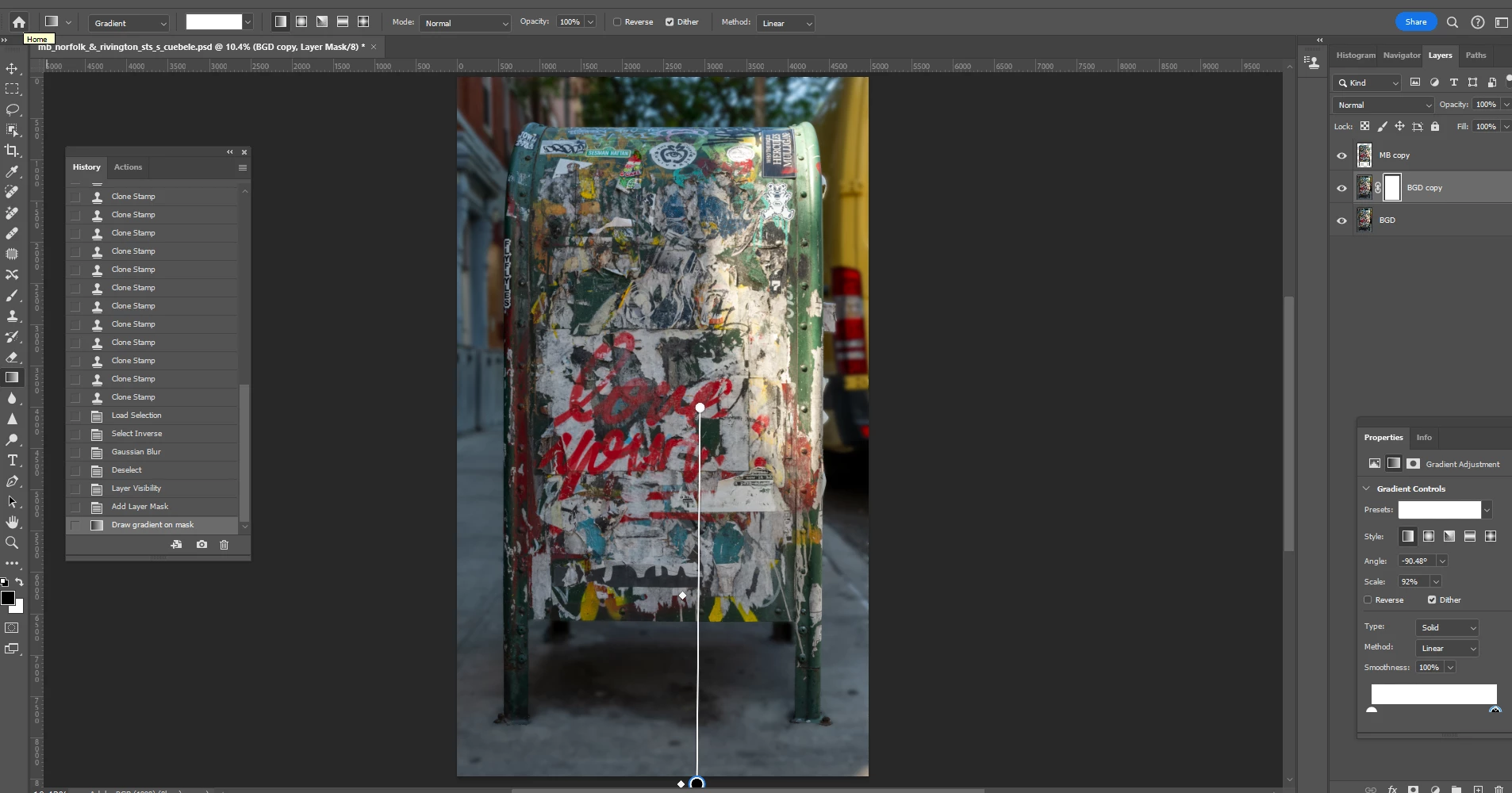
In the screen shot below, I have followed the steps outlined below to create a gradual blur beginning in the lower half of the image reaching full blur by the middle.  When I drag the cursor down the image to the bottom as outlined in step 8, it becomes blurry, as opposed to sharp at the bottom.  I have done this a hundred times before.  I don't know what's happening here.  Can anybody help?


  1. Click on the element only (top) layer on the image inside the icon and hit ctrl click.  Only the image will be selected.  Move your cursor back to the copied background layer.
  2. Invert the selection while on the background copy layer (ctrl shift i)
  3. Blur the layer by going to Filter, Blur, Gaussian Blur.
  4. Deselect the layer
  5. Turn the top layer on
  6. Add a layer mask to the copied background layer
  7. Select linear gradient
  8. Drag from the middle to the bottom of the image
 

This topic has been closed for replies.
Correct answer barbara_a7746676

On your screen capture it looks like the gradient is only white.


You need to select a linear gradient that is black and white, like this:

In the layer mask where the gradient is black it will hide what is on the active layer and where it is white it will show the pixels on the active layer.

1 reply

barbara_a7746676
Community Expert
barbara_a7746676Community ExpertCorrect answer
Community Expert
June 2, 2024

On your screen capture it looks like the gradient is only white.


You need to select a linear gradient that is black and white, like this:

In the layer mask where the gradient is black it will hide what is on the active layer and where it is white it will show the pixels on the active layer.

bartonlew
bartonlewAuthor
Legend
June 2, 2024

Thanks, Barbara.  I thought that looked wrong.  Intially when I clicked on that window, I got a dropdown saying "Basics, Blues, Purples" etc.  and neglected to click on the drop down next to Basics, which enabled me to select the correct option.  Thank you.