
Ivan Zajats
Inspiring
January 10, 2022
Answered

Gradient cut (a bug?)

  • January 10, 2022
  • 3 replies
  • 700 views

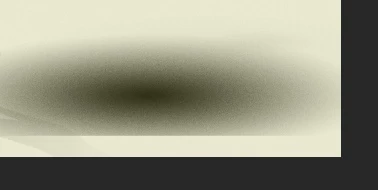
Here's what I see when make a gradient near the edge of the canvas and then move it.

Is there any setting to avoid this?
This topic has been closed for replies.
Correct answer melissapiccone

The gradient will always be cut of at the edge. If you want it to not be cut off, make it in the middle of your canvas or make a larger canvas.

3 replies

melissapiccone
Community Expert
melissapicconeCommunity ExpertCorrect answer
Community Expert
January 10, 2022

The gradient will always be cut of at the edge. If you want it to not be cut off, make it in the middle of your canvas or make a larger canvas.

Melissa Piccone | Adobe Trainer | Online Courses Author | Fine Artist
Ivan Zajats
Inspiring
January 10, 2022

my point is - if we create smth on a layer and move partially outside the canvas, it does not disappear, it's still there. so why can't we create a radial gradient partially outside the canvas? a bit strange for me

PECourtejoie
Community Expert
Community Expert
January 10, 2022

Hello, how are you creating the gradient? If you are applying a gradient on the edge of a pixel layer; that is expected. An alternative would be to use a gradient fill level, https://helpx.adobe.com/photoshop/using/adjustment-fill-layers.html with the proper blending modes, (black to white, in multiply) it could work as you want. 

Ivan Zajats
Inspiring
January 10, 2022

yep, I use the Gradient tool on a blank layer

just tried an adjustment as you recommended and there's another problem - it's hard to move it

then I put it into a group and it's possible to move, but if I set up a blend mode and then move the group, the blend mode effect disappears... and if the Gradient is linear it's also cut (has the same size as the canvas)