
Participant
November 4, 2012
Answered

Gradient Editor

  • November 4, 2012
  • 1 reply
  • 23282 views

The Gradient Editor is missing the the lower portion of the window.  No color stops for creating your own gradient colors or number of colors you want in your gradient.  The upper portion of window is their with the preinstalled gradient options.  Photoshop CS6.  I have searched high and low for a solution and reset the the tool and preferences.  No luck.  Please advise.
    This topic has been closed for replies.
    Correct answer Jeff Arola

    Hi NewLife_777,

    What operating system are you using?

    From where in photoshop cs6 are you looking for the Gradient Editor?

    You might post a screenshot of what your seeing.

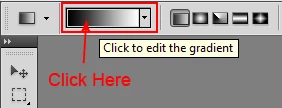
    If for example, it's the gradient tool, did you click on the Preview of the gradient?

    1 reply

    Jeff Arola
    Community Expert
    Jeff ArolaCommunity ExpertCorrect answer
    Community Expert
    November 4, 2012

    Hi NewLife_777,

    What operating system are you using?

    From where in photoshop cs6 are you looking for the Gradient Editor?

    You might post a screenshot of what your seeing.

    If for example, it's the gradient tool, did you click on the Preview of the gradient?

    Participant
    November 4, 2012

    Well duh... I can't believe I did that. Overthinking...I think.  You have resolved it.  I was clicking on the drop down arrow immediately to the right of the red arrow you placed.  That was opening a pop out window with all the preset gradient options but without the color stop options etc...  Clicking right where you state to click provides the full gradient editor window of have been struggling to find for over an hour.  Thank you so much...

    Participant
    January 20, 2018

    WOW....me too Thanks!!!