
Inspiring
September 6, 2021
Answered

Gradient won't save

  • September 6, 2021
  • 2 replies
  • 2968 views

I'm using Photoshop 22.5.0 on MacOS Big Sur 11.5.2.

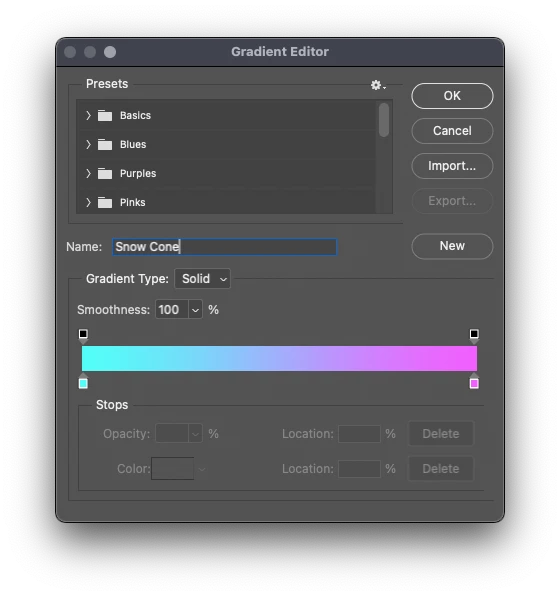
I have created a gradient on a Photoshop file, but if I assign it a name and press OK, it will not save, meaning if I go back to the gradient window, the name now says "Custom" and my previous name I assigned it cannot be found. I have also tried to click on the folder "Basics" and pressed OK to try to save it there, but nothing is there when I go back to this window. I have also tried exporting it into the gradients folder.


Correct answer exactspace

I just figured it out. You have to press "New" after you enter a name. 
I feel this thread should be closed or removed, but I also think this is a really misleading design choice. People will lose their work thinking that it was saved. 

2 replies

Participant
July 20, 2024

Thank goodness you didn't delete this. What a hideous UI design! The user has already clicked + to create a new gradient - why on earth don't they make "OK" function as a save when you have a new file. This is still an issue in Photoshop beta in July 2024

Participant
September 9, 2025

Still an issue as of September 2025. Enraging.

exactspaceAuthorCorrect answer
Inspiring
September 6, 2021

I just figured it out. You have to press "New" after you enter a name. 
I feel this thread should be closed or removed, but I also think this is a really misleading design choice. People will lose their work thinking that it was saved. 

Participant
July 19, 2022

This post should not be deleted. Almost everyone who will try it on their own will just click the OK button and be confused.

Participant
December 23, 2022

just happened to me, thanks for leaving open