
Participant
March 20, 2022
Answered

Graphics and Functionality Bug After Using Neural Filters

  • March 20, 2022
  • 2 replies
  • 915 views

Adobe Photoshop Version: 23.1.0 20211208.r.143 83e47c5 x64
Operating System: Windows 10 64-bit
Version: 10 10.0.19043.1586


So pretty much every time that I use a neural filter, after using it and exiting that screen, the image that was on it stays on my screen and it completely glitches out Photoshop. This is what I'm seeing:
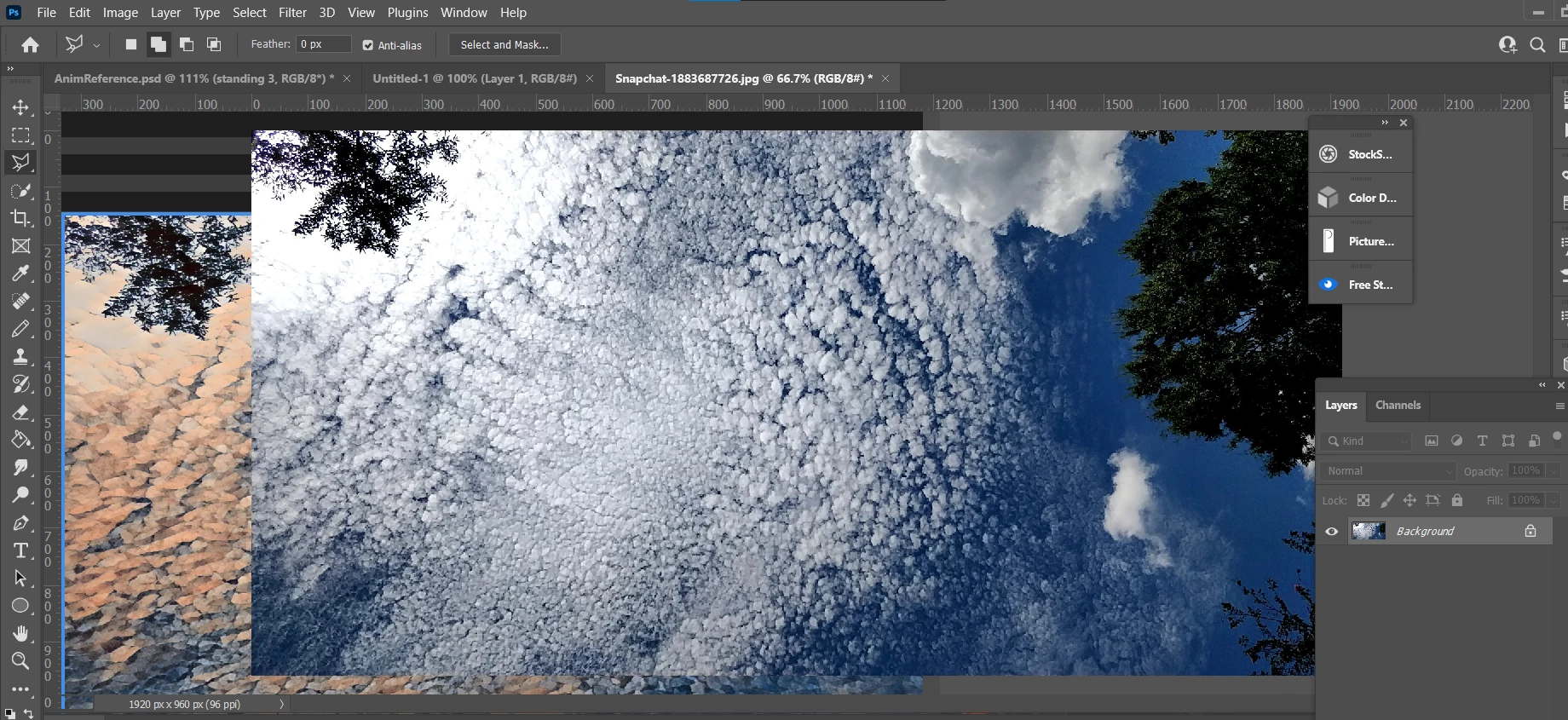
The image on the left is not supposed to be there and it just messes up the whole project.

This topic has been closed for replies.
Correct answer J453

Go to Preferences > Technology Previews... and check "Disable Native Canvas" - then restart Photoshop. Does the problem still occur?

2 replies

Mark.Dahm
Community Manager
Community Manager
September 14, 2022

We believe that underlying issue of the Photoshop home screen appearing where the document canvas should be (temporarily worked around by selecting the ‘Deactivate native canvas button’ in Technology Preview) has been fixed, and you may now de-select that button for future Photoshop sessions. Please let us know if any of these issues return once the native canvas has been re-activated.

J453Correct answer
Legend
March 20, 2022

Go to Preferences > Technology Previews... and check "Disable Native Canvas" - then restart Photoshop. Does the problem still occur?

Participant
March 6, 2023

Thank you, that fixed it. It would be cool if there was a notification bar in Adobe apps such as PhotoShop. That way we would always be able to see responses to support/forums even if we don't check our emails.