



bartonlew
Legend
April 19, 2021
Answered

graphics processor unknown

  • April 19, 2021
  • 5 replies
  • 3794 views

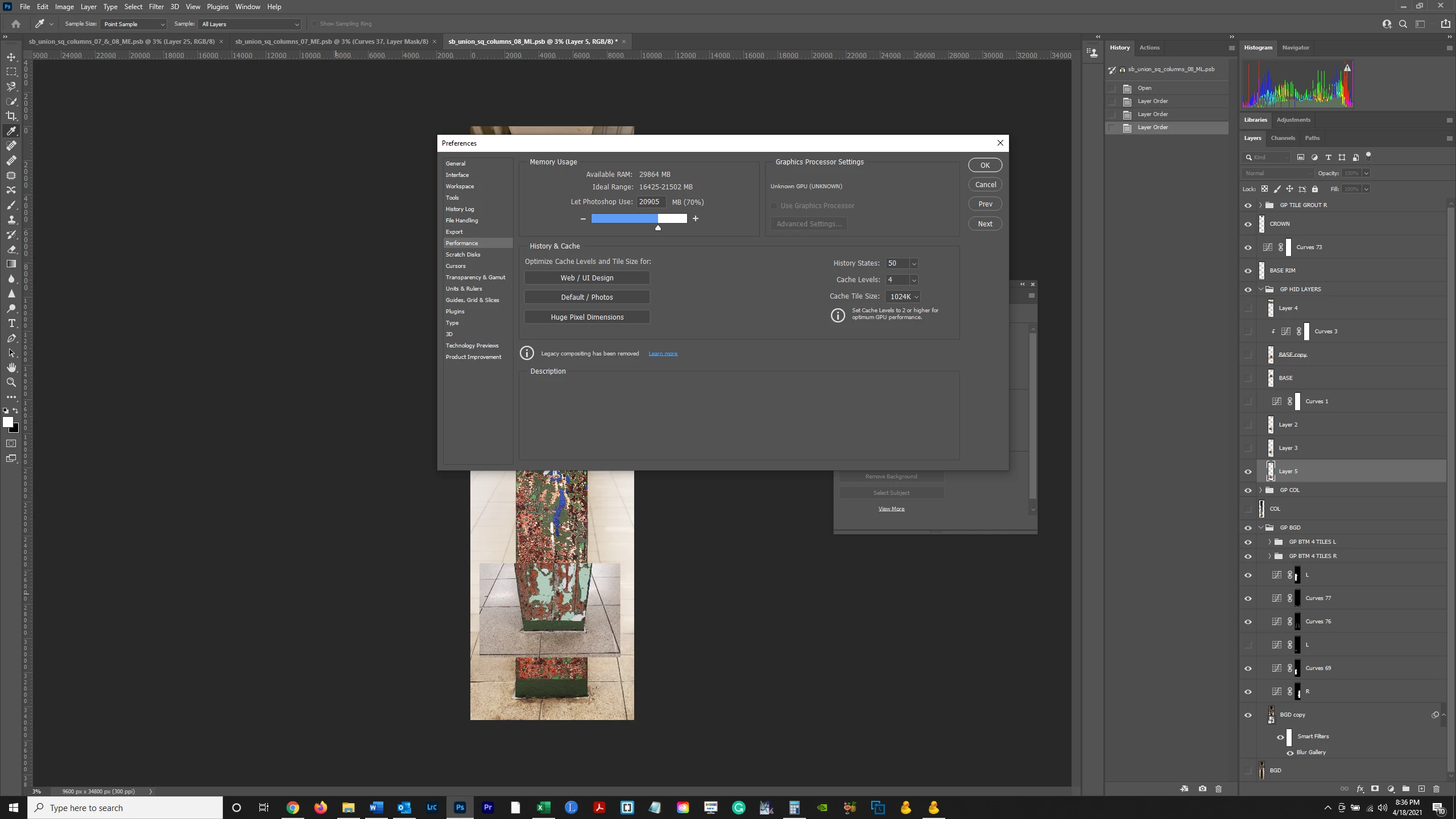
Perspective wrap is grayed out and I remember having the problem before and being told to click on "Use Graphics Processor" and also to make sure NVIDIA is checked as the graphics processor to use.  But I apparently have a bigger problem - GPU is listed as "unknown".  How do I fix this?  Thanks. 


This topic has been closed for replies.
Correct answer JMRLFC

They {Adobe techs} spent over two hours via remote sharing trying to fix my laptop with same problem it would not recognise myNvidia GeForce GTX 1650 Ti at the end all they could do was revert it back to older version & tell me hopefully a patch will be forthcoming so I'm not happy it's a Dell refurbished which I paid £2000 for with my spech 2x 2tb SSD'S 64Gb Ram etc a big jump from my previous model & I was looking forward to putting it through it's paces don't expect this sort of oversight when it comes to releasing updates & it's clearly a problem for many so I hope Adobe are working round the clock to rectify this

5 replies

Jmada
Participant
May 10, 2021

Thanks for the post.

Been struggling with this for a few weeks, I had to go to v 21.2.7 to get it to work, but now it does 🙂

Funny thing is that Illustrator recognised it and has no issues in the latest version.

Many thanks.

Participant
May 10, 2021

It is the same with Lightroom. There was no problem in the past. Only PS doesnt sometimes not recgnise the GPU. Last year, I watched this behavior last year sometimes without knowing the reason for it.

Best regards


Inspiring
April 30, 2021

Thanx for the post. I have been struggling for the past week with the same problem.

Photoshop keeps saying that my display driver (NVIDIA GEForce GTX 1050) has an error and needs to be updated. 

When I trash my preferences, it works for a few hours, then greys out again.

I now reverted to version 22.3 and it seems to work again.

CL

Participant
May 7, 2021

having the same issue Albert , could i ask how can i revert back to version 22.3?


cheers 

Daniel 

jane-e
Community Expert
Community Expert
May 7, 2021

Hi @DanielFagan 

You can revert in the Creative Cloud app. See the Help page for details:

https://helpx.adobe.com/download-install/using/install-previous-version.html


~ Jane

Participant
April 23, 2021

Since today morning I had the same Problem. No graphic processor was recogniced. My graphiccard is AMD Radeon RX 5700 XT. I could fix the problem with deinstall und install the version 22.3.0. In this case  the automatic ubdate is disabled. I must later activate updateprocedure when error is found.


bartonlew
bartonlewAuthor
Legend
April 20, 2021

I also can't use the Blur Gallery.  The center point and side wheel for adjusting blur value in Tilt Shift Blur are missing - in their place just a black circle with a white dot and white rim that do not do anything.  This feature is critical to the project I am curretly working on.  So what should I do?  I am on hold with Adobe now for like a half hour without speaking to anyone yet.  Should I wait to speak to someone or just install a prior version of PS?  Thanks for your help.

JMRLFC
JMRLFCCorrect answer
Participating Frequently
April 19, 2021

They {Adobe techs} spent over two hours via remote sharing trying to fix my laptop with same problem it would not recognise myNvidia GeForce GTX 1650 Ti at the end all they could do was revert it back to older version & tell me hopefully a patch will be forthcoming so I'm not happy it's a Dell refurbished which I paid £2000 for with my spech 2x 2tb SSD'S 64Gb Ram etc a big jump from my previous model & I was looking forward to putting it through it's paces don't expect this sort of oversight when it comes to releasing updates & it's clearly a problem for many so I hope Adobe are working round the clock to rectify this

bartonlew
bartonlewAuthor
Legend
April 20, 2021

I finally got someone on the line at PS and he confirmed - the recent version has bugs and they're working on it.  We uninstalled and went to the prior version, and everything is working fine - perspective warp and blur gallery are back on track.  I'm happy at least that there is a solution for now and they're working on the long term.