
dmshort
Known Participant
November 5, 2016
Answered

Grayscale not smooth in photoshop but is in lightroom

  • November 5, 2016
  • 2 replies
  • 1281 views

I'm trying to finish editing a black and white image in photoshop that I started working on in lightroom. I'm using the latest versions of Lightroom CC and photoshop CC.

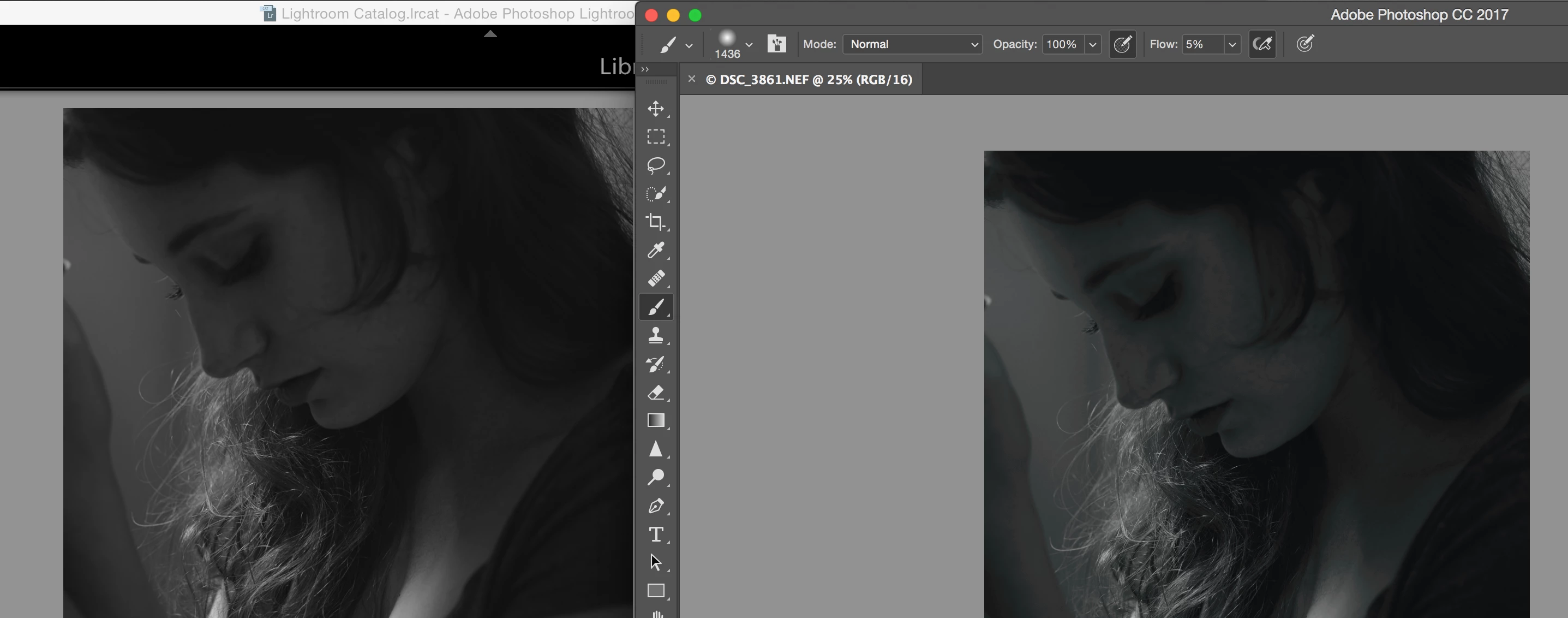
Below is a screenshot of the two images in Lightroom (left) and Photoshop (right). All I have done to the image in photoshop is open it through lightroom. As you can see from the screenshot, the image in Lightroom doesn't have any issues whereas the image in photoshop doesn't look as though it's showing the full grayscale range and is full of banding.

I only have this issue inside of Photoshop. If I export the image from Lightroom and open it in Preview or through another photo viewing app they all look identical to the Lightroom image. This makes editing the photo extremely difficult.

Please help.

Thank you.
This topic has been closed for replies.
Correct answer D Fosse

Are you sending this to Photoshop as ProPhoto RGB?

This looks very much like a long-standing bug in Photoshop/OpenGL. This bug can sometimes result in strong shadow banding, with or without cyan bands, when you have GPU set to "normal" or "advanced". The problem was first reported here around CS5.

The banding occurs in the conversion from ProPhoto to monitor profile, when that conversion is executed by the GPU. It disappears in the "basic" setting as the conversion is then handled by the CPU in the traditional way. It also varies with type of monitor profile.

Only ProPhoto is affected, probably because the strong shadow compression results in rounding errors. Try Adobe RGB and see if it still happens.

There are other possibilities, but this would be my first guess.

2 replies

D Fosse
Community Expert
D FosseCommunity ExpertCorrect answer
Community Expert
November 5, 2016

Are you sending this to Photoshop as ProPhoto RGB?

This looks very much like a long-standing bug in Photoshop/OpenGL. This bug can sometimes result in strong shadow banding, with or without cyan bands, when you have GPU set to "normal" or "advanced". The problem was first reported here around CS5.

The banding occurs in the conversion from ProPhoto to monitor profile, when that conversion is executed by the GPU. It disappears in the "basic" setting as the conversion is then handled by the CPU in the traditional way. It also varies with type of monitor profile.

Only ProPhoto is affected, probably because the strong shadow compression results in rounding errors. Try Adobe RGB and see if it still happens.

There are other possibilities, but this would be my first guess.

dmshort
dmshortAuthor
Known Participant
November 5, 2016

That definitely solved the problem. It's strange though that it's just with this image so far. I've edited other black and white files and not had this issue or the issue was still there, just not noticeable.

I have noticed the blacks are more black in Photoshop than they are in Lightroom with both color and black and white images and some color images appear more saturated in Photoshop than they do in Lightroom. The editing process turns into a save in Photoshop, view in Lightroom, mentally remember what the image looked like in Lightroom and then make fine tuned adjustments in Photoshop. I'm using a 2015 Macbook Pro with Xrite iDisplay Pro for the monitor calibration color profile. 

Hopefully this bug with ProPhoto will get fixed. Though, if it's been around since CS5 I'm not holding my breath.

Thanks for your help!

D Fosse
Community Expert
Community Expert
November 5, 2016

dmshort wrote:

Hopefully this bug with ProPhoto will get fixed.

Hopefully, but it's a pretty evasive bug. Photoshop engineers have been aware of it and acknowledged the problem. It's probably a small error inherent in OpenGL code, and as such beyond their control.

Also, there are several variables. Table-based monitor profiles seem more affected than matrix-based, even made by the same calibration software. For me, using Eizo ColorNavigator, the difference between table and matrix is dramatic. After I got a NVidia Quadro card, and replaced the video driver, the banding disappeared completely with matrix profiles.

I do notice that you also seem to have some black clipping, in addition to banding. The profile policy could affect this too. Matrix and version 2 always seem to be the safer options.

JJMack
Community Expert
Community Expert
November 5, 2016

We may not see any difference the image posted here is 8bit color depth and it look like you are using 16bit color in the window bar title. Was 16bit use throughout your entire process.  Was either grayscale image ever 8bit depth?

JJMack
dmshort
dmshortAuthor
Known Participant
November 5, 2016

Thanks for the response.

The image in Lightroom is a RAW rendering and was opened into Photoshop as 16-bit. No conversions between 8-bit to 16-bit were ever done. All that was done were basic adjustments to the RAW file in Lightroom and open the image into Photoshop at 16-bit.