StayingCreative
Participant
October 24, 2021
Answered

Greyed out Lighting Effects tool.

  • October 24, 2021
  • 2 replies
  • 453 views

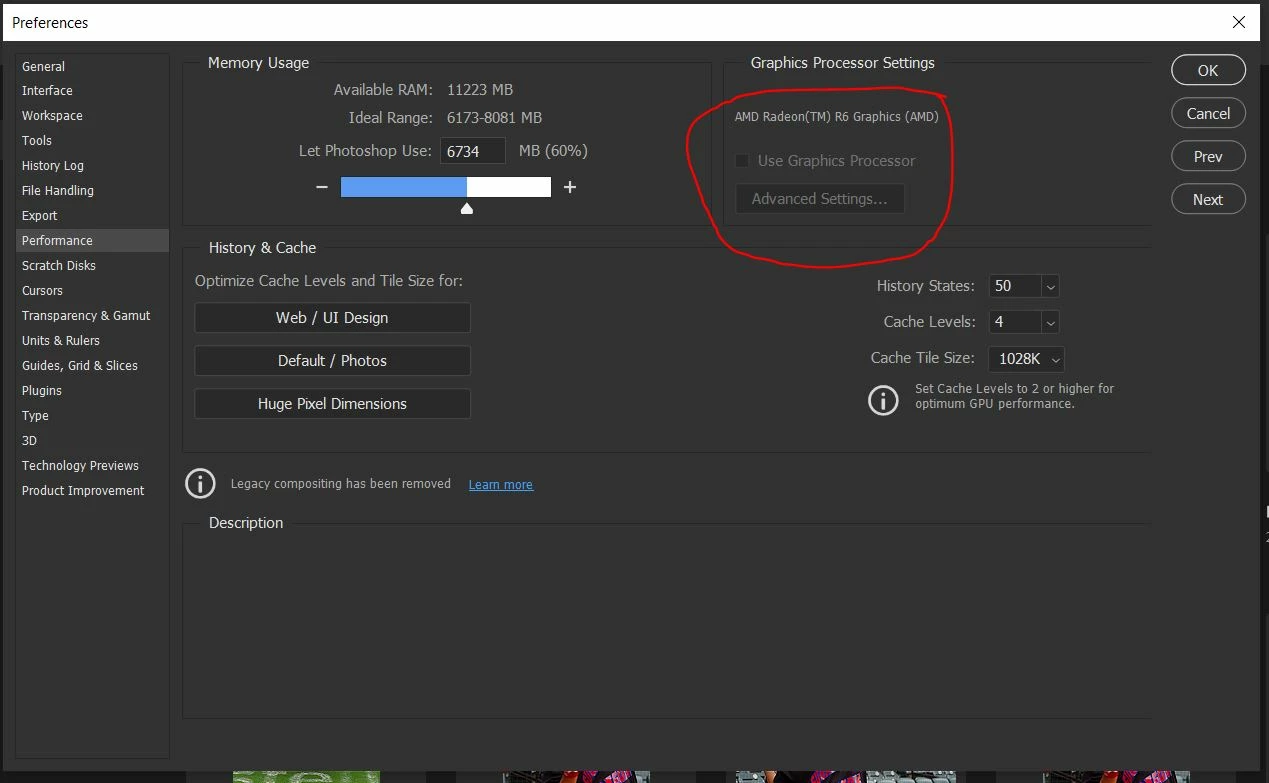
I cannot use my lighting effects tool because it is greyed out.  I have read some of the responses on this issue here in this community.  However, under the Edit> Preferences> Proformance dialog box, the graphics options is also greyed out. How can I fix this? Below is a copy of my system infomation.  Also an attachment of a screen shot of my Proformance dialog box.


Adobe Photoshop Version: 22.5.1 20210907.r.441 de74e1a x64
Number of Launches: 31
Operating System: Windows 10 64-bit
Version: 10 or greater 10.0.19041.1202
System architecture: AMD CPU Family:15, Model:0, Stepping:1 with MMX, SSE Integer, SSE FP, SSE2, SSE3, SSE4.1, SSE4.2
Physical processor count: 4
Processor speed: 1896 MHz
Built-in memory: 15310 MB
Free memory: 8402 MB
Memory available to Photoshop: 11224 MB
Memory used by Photoshop: 60 %
SAM SDK Version: 2.0.0-main.779.1
ACP.local Status:
- SDK Version: 1.48.0
- Core Sync Status: Reachable and compatible
- Core Sync Running: 4.21.1.1
- Min Core Sync Required: 4.3.28.24
Live Edit Client SDK Version: 3.82.01
Manta Canvas: Enabled.
Alias Layers: Disabled.
Modifier Palette: Enabled.
Highbeam: Enabled.
Image tile size: 1028K
Image cache levels: 4
Font Preview: Medium
TextComposer: Latin
======= GPU
Native API stable: True
OpenGL API stable: True
OpenCL API stable: True
GPUDeny: 0
GPUForce: 0
useGPU: 0
useOpenCL: 0
isGPUCapable: 0
GPUName: AMD Radeon(TM) R6 Graphics
GPUVendor: AMD
IsNativeGPUCapable: 1
IsOpenGLGPUCapable: 1
IsOpenCLGPUCapable: 1
HasSufficientRAM: 0
GPU accessible RAM: 1,037 MB
Required GPU accessible RAM: 1,500 MB
UseGraphicsProcessorChecked: 1
UseOpenCLChecked: 1
Windows remote desktop: 0
Display: 1
Display Bounds: top=0, left=0, bottom=1440, right=2560
 

You need to ask program questions in the forum for the program you are using
To ask in the forum for your program please start at https://community.adobe.com/
Moving from Using the Community (which is about the forums) to the correct forum... Mod
This topic has been closed for replies.
Correct answer StayingCreative

Hello, Jeffrey


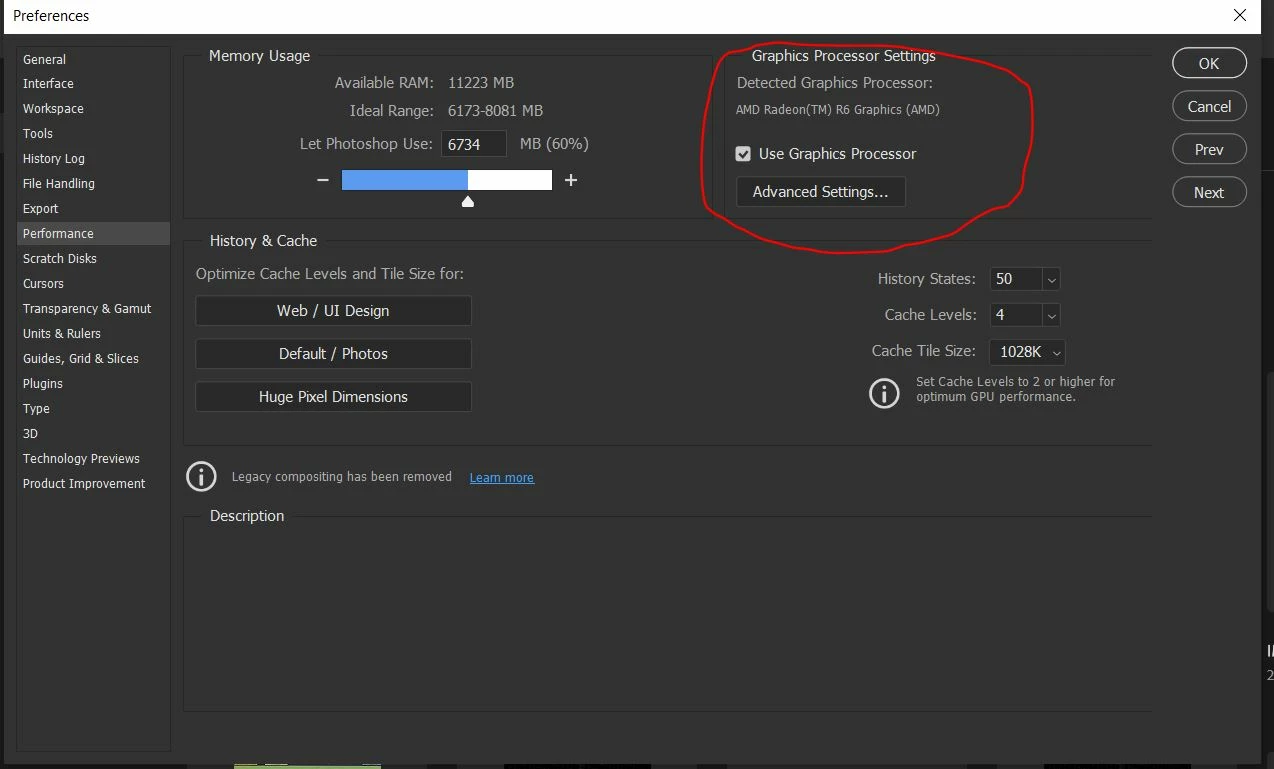
Thank you for your response.  I plan on doing more upgrades as I upgraded my memory to its max about a year ago.  However, I found out what was the issue. Windows was preventing the Radeon drivers from being updated.  So I had to disable Windows System Properties using this file: sysdm.cpl.  I placed this filename in the search box and a dialog box comes up.  I, then selected the Hardware tab and clicked on Device Installion Settings.  I chose "No" to disable Device Installion Settings, then uninstalled then re-installed the Radeon Graphic Card Drivers from the vendor. 

   I was able to adjust my greyed out settings in photoshop.  See below.  Thank you again for your help.


2 replies

Legend
October 25, 2021

Not enough VRAM either:

GPU accessible RAM: 1,037 MB
Required GPU accessible RAM: 1,500 MB


You'll need to upgrade your graphics card.

StayingCreative
StayingCreativeAuthorCorrect answer
Participant
October 26, 2021

Hello, Jeffrey


Thank you for your response.  I plan on doing more upgrades as I upgraded my memory to its max about a year ago.  However, I found out what was the issue. Windows was preventing the Radeon drivers from being updated.  So I had to disable Windows System Properties using this file: sysdm.cpl.  I placed this filename in the search box and a dialog box comes up.  I, then selected the Hardware tab and clicked on Device Installion Settings.  I chose "No" to disable Device Installion Settings, then uninstalled then re-installed the Radeon Graphic Card Drivers from the vendor. 

   I was able to adjust my greyed out settings in photoshop.  See below.  Thank you again for your help.


Bojan Živković11378569
Community Expert
Community Expert
October 25, 2021

Photoshop needs 2000 or greater passing score https://www.videocardbenchmark.net/directCompute.html. It seems your graphic card (Radeon R6) is below that mark. I guess the way to fix is to replace graphic card.

StayingCreative
Participant
October 26, 2021

Hello, Bojan


Thank you for your response.  I plan on doing more upgrades as I upgraded my memory to its max about a year ago.  However, I found out what was the issue. Windows was preventing the Radeon drivers from being updated.  So I had to disable Windows System Properties using this file: sysdm.cpl.  I placed this filename in the search box and a dialog box comes up.  I, then selected the Hardware tab and clicked on Device Installion Settings.  I chose "No" to disable Device Installion Settings, then uninstalled then re-installed the Radeon Graphic Card Drivers from the vendor. 

   I was able to adjust my greyed out settings in photoshop.  See below.  Thank you again for your help.