
Participating Frequently
August 19, 2020
Question

Grids useless with GPU

  • August 19, 2020
  • 2 replies
  • 570 views

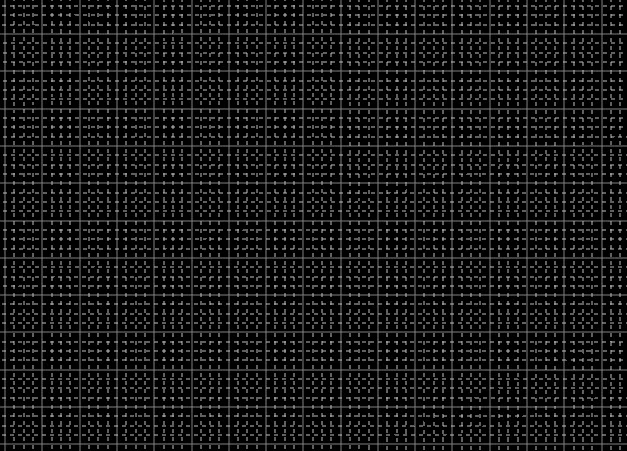
Since I updated to 20.2., if I activate the grid, it shows thicker lines shaped like an L or so. I can't zoom, it just jumps around, the dynamic zoom doesn't work at all. It is a horror, I can't work with these new grids, which I need all the time. With version 20.0.9 everything was fine.

Beside guides and grids look terrible, performance with thick grid is very bad. I tried to turn off GPU support and grids backs to normal (thin) but performance is not so good as with GPU. I can’t use 3D and many more things. Without GPU I might as well get rid of PS and buy some Mickey Mouse SW.

The official response from Adobe was, the release of Photoshop 21.2.1 should resolve this issue. NO, it didn’t, also 21.2.2 didn’t fix it. Why was it changed in the first place? Why change a running system? Doesn’t Adobe check everything BEFORE they release a new version?
This topic has been closed for replies.

2 replies

TheDigitalDog
Inspiring
August 19, 2020

First, what OS? 

IF you find bugs with a GPU (and by turning it off, the issue goes away and that's a GPU bug), you need to attempt to update that GPU. The reason you have an option to turn OFF GPU is because there are so many of them and they can't all be tested and many on Windows have severe bugs. Your options are, turn it off (and run slower), get it updated if possible, replace the GPU. 

Author “Color Management for Photographers" & "Photoshop CC Color Management/pluralsight"
Participating Frequently
August 19, 2020

Thanks for the really quick reply.

I use Windows 10 Enterprise, version 20H2.

Intel Core i7-3820 CPU, 3.60GHz 4.00 GHz, RAM 16 GB, 64 Bit

I have an Eizo FS2333 monitor and the graphic card NVIDIA GeForce GTX 670, driver vers. 452.06, all up to date. The graphic card is one tested by Adobe. I wouldn’t have a problem buying a new one, when the problem is then fixed. But everything was ok till version 20.0.9. If I had a warning, I just wouldn’t have updated.

I need a grid with 30 px for some work. When I don’t need the grid, naturally I turn it off and everything is fine.

Here you can see that a lot of people have the same problem, maybe they explained it in better English.

https://feedback.photoshop.com/photoshop_family/topics/this-new-grid-any-way-to-revert-it?topic-reply-list%5Bsettings%5D%5Bfilter_by%5D=all

TheDigitalDog
Inspiring
August 19, 2020

"The graphic card is one tested by Adobe."


Well if you say so, it appears to be the problem since you tell us turning it off fixes the issue. Has nothing to do with the Eizo. 

It's well know again, that some GPU's are problemtic. Adobe may be able to address this or an update to the 'driver' might but at this point, the only fix is to use it on and see the ugly overlay OR turn it off when you don't want to see it. 

Did you update the new build for Photoshop that came out, I think yesterday? 

Author “Color Management for Photographers" & "Photoshop CC Color Management/pluralsight"
JJMack
Community Expert
Community Expert
August 19, 2020

Why would you want to use a grid on a image zoomed way out or one a very small image.  Use Ctrl+' turn it off at that scale.


JJMack
Participating Frequently
August 20, 2020

My above sample was just that to show the grid as I don't know how describe it in english. I need the grid for layouts on a 4000x4000 px paper. The distance between the photos should be 30 px. To turn off the grid is a strange answer. I only activate to place the picture of course. If your car doesn't run, do you push it instead ? 😉