
Participating Frequently
March 4, 2020
Answered

Hand Tool won't work in Photoshop 2020 with spacebar

  • March 4, 2020
  • 15 replies
  • 19575 views

In Photoshop 2020,  when zoomed in and using the Lasso tool and wishing to engage the Hand tool (by pressing the spacebar) the Hand tool doesn't work.


Here is some addtional information that may be relevant.


I  have both Photoshop 2020  and Photoshop cc 2019 installed on my computer (Windows 10).  The  Hand tool works fine with Photoshop cc 2019.  


..If I open Photoshop by clicking on a file (rather than opening Photoshop first), a JPEG file always will open with Photoshop 2020, even when I select  Photoshop cc 2019.


..In Photoshop cc 2019 the hand tool works with the lasso plus spacebar regardless of what other apps are open.  With Photoshop 2020, it doesn't work with the lasso tool plus spacebar under any circumstances.


I realize that the short term solution may be "use Photoshop cc 2019",  but I am wanting to get this fixed realizing that about a year from now "Photoshop cc 2019" may not be available to me.


Hope you can help


Thanks


This topic has been closed for replies.
Correct answer JJMack

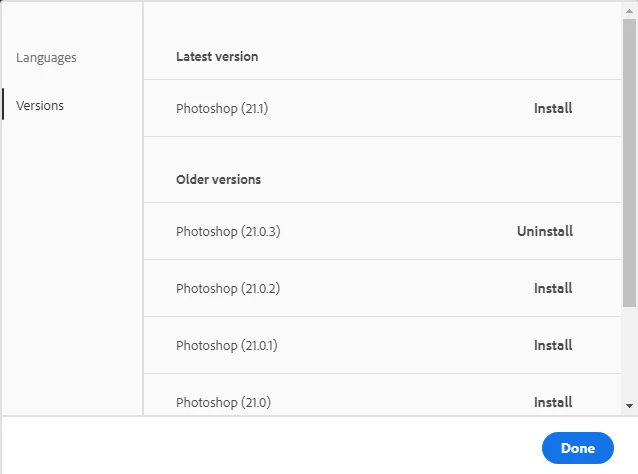
Which 2020 version are you using I dropped back to version 21.0.3  I had major problems with 21.1.0. If you have a Wacom Pen I would advise you to use 21.0.3


15 replies

Participant
May 7, 2020

I had a similar problem. It appeared that another application was using the same keyboard combination. In my case Siri was the culprit. I switched it off.

tinad439915
Participating Frequently
May 8, 2020
Did it work after you turned Siri off?

Tina Davidson
703-403-1131
www.TinaDavidsonPhotography.com
www.AlteredStatesPhotography.com
Sent from my iPhone
Known Participant
October 14, 2020

I was so hopeful but that did not work for me : ( 

Participant
April 23, 2020

I'm using versin 21.1.2 and bont have a problem

Participant
April 8, 2020

I tried in every way and I still not find a solution after months. I tried to close every apps, plugins, processes in the MacOS monitoring app, reinstalling Photoshop 21.0.3.

Nothing solves the problem, every Adobe CC app (except AE) has the same problem, the hand tool with spacebar doesn't work.


I solve it only restarting the mac, but without any warning, after few minutes or hours or days, the problem starts again.

Then it goes away on his own, then returns, and again again again.


Please, if someone as found a solution let me know. A repeat, it happens with Illustrator, Photoshop, etc. Only AE works.


Thanks

tinad439915
Participating Frequently
April 22, 2020

Hi - I'm using PS 21.1.2 and the problem still isn't fixed. How do I get the spacebar to be my shortcut for the hand tool? Anybody figure this out?  

Participant
March 31, 2020

How do you move back to the previous version?


Edit: Switching back to 21.03 did not fix the problem for me, the spacebar still does not bring up the hand tool.

Participant
April 9, 2020

Same for me. I tried every possible action. There's no way apparently

Michael Bullo
Community Expert
Community Expert
March 4, 2020

Did you try resetting the preferences in Photoshop 2020?

ronboyAuthor
Participating Frequently
March 11, 2020

Thanks - I looked in prefrences and couldn't find anything that looked like it might help.  I found something in one of the links provided that suggested holding down down shift, cntrl, alt while starting the adobe app (in this case Photoshop 2020) and that didn't help.