So I'm trying to use the adjustment layer option where it only affects the layer beneath it, but as soon as I click that button, all of the level adjustments I made disappear. Is there something I'm doing wrong? Thanks!
My goal is to darken the lines in that layer, the grayscale lines that I have for my initial sketch. Is there no way to do that without making every other layer underneath it darker?
My goal is to darken the lines in that layer, the grayscale lines that I have for my initial sketch. Is there no way to do that without making every other layer underneath it darker?
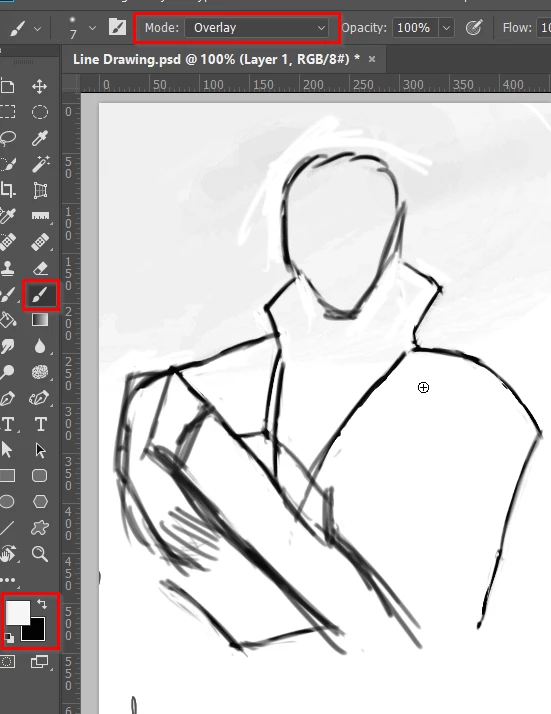
Do you know the trick setting the brush's blend mode to Overlay in the Options bar? Paint with white to remove the lighter lines, and black to reinforce the darker lines.
Copy the line work layer and set to Multiply to make it darker.
Or if you are using Windows, take a look at Lazy Nezumi Pro
CC2018 now has brush smoothing built in, and it works quite well. Not quite as well as LNP, and LNP has a host of added extras, but still a welcome new feature for Mac users I'm thinking.
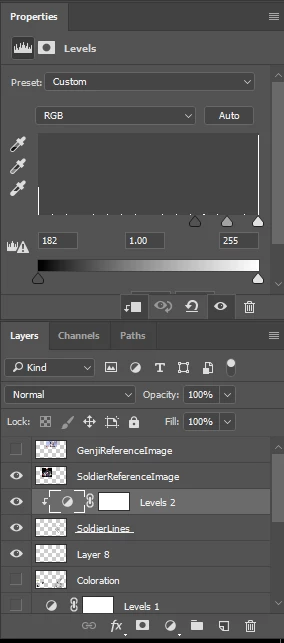
It maybe best to capture your entire screen with the layers panel open so we can see what is happening. Then there will be less guessing on how to fix.
Here, I'll attach three screenshots of the whole thing. The first is of the original sketch. The second is with the adjustment layer turned on, which darkened the lines to where I wanted them, but also darkened a sky painting underneath, which I do not want. The third is with the adjustment layer turned on, after Alt+LClicking in between the two layers so that it should only apply to the sketch. Both images levels returned to the original, and no layers are affected. Sorry, my handwriting with this Intuos is awful, but I tried to explain the problem in the images as well.
Try making the adjustment layer a clipping layer before making the adjustments. then it will show what is in just the next layer instead of all the layers below it.
Yeah, that's what I tried, and as soon as I do that, it no longer affects that layer either....It's either EVERYTHING beneath it, or nothing at all, it seems.
Nothing lost but you made the adjustment layer for a layer that hasn't colors (SolidLines). because of making a clipping mask Just the layer (solidlines) will be affected by the adjustment layer. If you need to make it affects other layers beneath you can press Ctrl+Alt+G to release the clipping mask.
The (Level) adjustment layer doesn't have more lines in the histogram because no color levels in the layer beneath it.

 AdChoices