

Nic-B
Known Participant
November 18, 2022
Answered

Having to use shift again to scale in proportion?

  • November 18, 2022
  • 2 replies
  • 1098 views

Using photoshop 24.0.0 on Macbook Air M2.


Hi guys,

I recently updated my photoshop to the latest version (as of last week), and it appears that scaling/transforming an object is not proportional anymore by default?


In older versions we used to have to hit shift at the same time as scaling, to keep everything in proportion, then Adobe did that awesome update where the proportional scaling was default (and using shift would actually distort the image).

Now it seems like we're back to having to use shift to keep the proportions?


Is this a bug maybe, or did Adobe decide to change it back for some reason? 

I looked at my photoshop settings, I've toggled the "use legacy free transform" but either way that didn't change anything, is there another option somewhere else? 


Thanks!
 

This topic has been closed for replies.
Correct answer jane-e


@Kevin Stohlmeyer wrote:

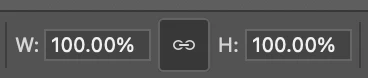
Go to the options bar at the top of your window and unlink the W&H.


@Nic-B wrote:

then Adobe did that awesome update where the proportional scaling was default


To keep the Width and Height proportional, Link them instead of Unlink them. I think Kevin may have accidentally misread your post.


Jane


2 replies

Jeff Arola
Community Expert
Community Expert
November 19, 2022

Adobe just released an 24.0.1 photoshop update, so i would go to the Creative Cloud Desktop Application and install the 24.0.1 update and see if the issue gets resolved.


If after installing the 24.0.1 update and there is no change in the transform behaviour, reset your photoshop preferences by going to Photoshop>Preferences>General, clicking on Reset Preferences On Quit and restarting photoshop.

Then check the transform behaviour.


https://helpx.adobe.com/photoshop/using/preferences.html


Kevin Stohlmeyer
Community Expert
Community Expert
November 18, 2022

Go to the options bar at the top of your window and unlink the W&H.


You can also do this in the Properties panel:


jane-e
Community Expert
jane-eCommunity ExpertCorrect answer
Community Expert
November 18, 2022


@Kevin Stohlmeyer wrote:

Go to the options bar at the top of your window and unlink the W&H.


@Nic-B wrote:

then Adobe did that awesome update where the proportional scaling was default


To keep the Width and Height proportional, Link them instead of Unlink them. I think Kevin may have accidentally misread your post.


Jane


Kevin Stohlmeyer
Community Expert
Community Expert
November 18, 2022

You are correct @jane-e ! Thanks for clarifying.