michael287376491
Participant
January 17, 2017
Answered

hello ! I am not very good at photoshop , but my tools ( in photoshop ) is not like the ones from tutorials . . , maybe I have an update , idk . and if is update , cant i come to the old photodhop ?(before this update )

  • January 17, 2017
  • 3 replies
  • 281 views

    This topic has been closed for replies.
    Correct answer barbara_a7746676

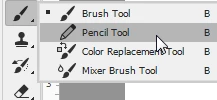
    Many of the tools are grouped with other tools. It's possible that the tool being used in the tutorial is hidden. Just press on the group of tools and slide your cursor over to the tool you want.
    3 replies

    barbara_a7746676
    Community Expert
    barbara_a7746676Community ExpertCorrect answer
    Community Expert
    January 17, 2017

    Many of the tools are grouped with other tools. It's possible that the tool being used in the tutorial is hidden. Just press on the group of tools and slide your cursor over to the tool you want.

    davescm
    Community Expert
    Community Expert
    January 17, 2017

    Hi

    Which tools are you trying to use and which version of Photoshop are you using.

    A screen snapshot of the tool that you are using and a link to the tutorial would help us to help you

    Dave

    Barb Binder
    Community Expert
    Community Expert
    January 17, 2017

    I'm going to move this to the Photoshop forum for you.

    In the meantime, this article shows you how to return to earlier cloud versions of Photoshop.

    Adobe Creative Cloud: It’s Not Working After the Upgrade - Rocky Mountain Training

    In current version of Photoshop, the tool display is tied to the workspace. To see all the tools:

    Window > Workspace > Essentials

    Window > Workspace > Reset Essentials

    https://www.rockymountaintraining.com/adobe-photoshop-cant-find-tool/

    ~Barb at Rocky Mountain Training