
Participant
July 26, 2023
Answered

Help! Adjustment Levels not working to change fill color

  • July 26, 2023
  • 2 replies
  • 985 views

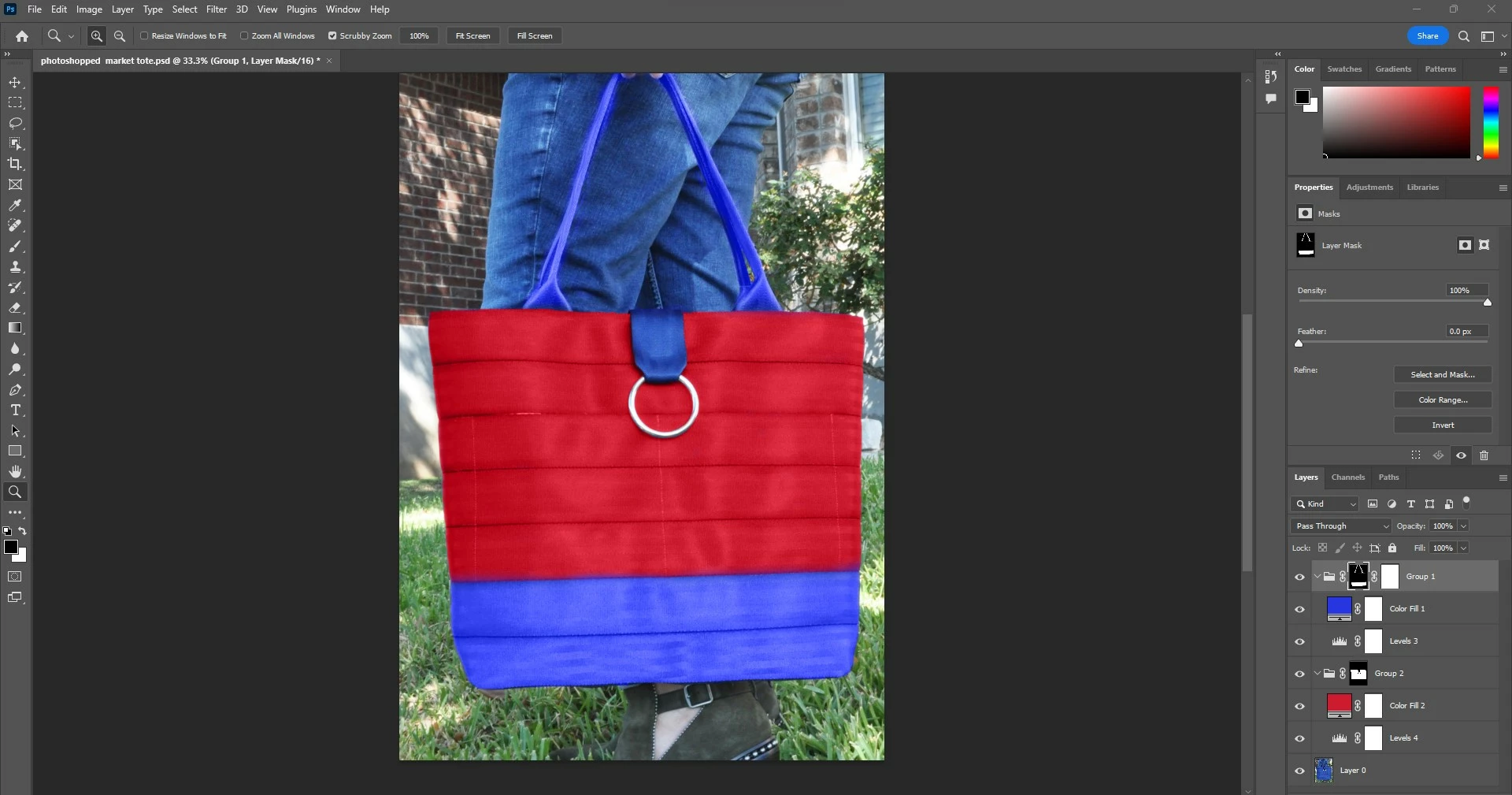
I'm a newbie and followed a video tutorial for adjusting fill color to a mask layer. I have two groups that each have a mask, a fill color and a level layer. The adjustment sliders in the level of one group work to change the color (the blue group). The levels on the other group do nothing to adjust the color (red group). I've tried moving the groups above and below each other and tried the suggestions on a google search: resetting preferences and viewing at 100%. Any ideas...remember I'm new so dummy it down for me. TIA! sarah   

P,S, I am on a hp, windows 11, running photoshop 24.6.0
 

This topic has been closed for replies.
Correct answer Kevin Stohlmeyer

Hi @sarahg100 your adjustments need to be above the layers you are trying to change (the two color layers). Move each Levels adjustment above the correpsonding color fill layer.

2 replies

George_F
Community Expert
Community Expert
July 27, 2023

Just in case this helps any, for this sort of adjustment I typically use a Hue/Saturation adjustment layer with the "Colorize" button checked.


I find it particularly useful with really bright or really dark colors, which are easy to set with the luminance slider after choosing the hue and setting the saturation level.


Cheers!

George F, Photographer & Forum Volunteer
Kevin Stohlmeyer
Community Expert
Kevin StohlmeyerCommunity ExpertCorrect answer
Community Expert
July 26, 2023

Hi @sarahg100 your adjustments need to be above the layers you are trying to change (the two color layers). Move each Levels adjustment above the correpsonding color fill layer.

sarahg100Author
Participant
July 26, 2023

@Kevin Stohlmeyer ! You are a gem! Thanks so much for the speedy response! That is exactly opposite of what the tutorial guy said to do. Now it seems I have a new issue....would you mind helping with one more thing? .The original photo is of an all blue bag (pretty dark). I am trying to get the group 1 color (the top part of the bag) to be a light color but as much as I slide those scales on the levels around, it just won't work. This is the best I have gotten...can you not put a light color over a dark?? Thanks for your thoughts...

Kevin Stohlmeyer
Community Expert
Community Expert
July 26, 2023

Hi @sarahg100 you'll need to learn how Levels work. Looking at your screenshot you've moved the black and midtone sliders down considerably to the right. Click the reset button (middle button at bottom of panel) and slide the white slide to the left instead.