
Question
(HELP) Animating in Photoshop! Frames not lining up to their designated frame tick mark!
Hello!
I apologize in advance because I'm not good at explaining problems and also I'm fairly new to using Photoshop.
(Problem):
Frame rate: 24f/s
In the screenshot, if you focus on the selected Layer 1 it should end at 06f instead of ending between 06f and 07f.
The frame before ends right at 04f like it's meant to.
When I replay it, my animation is out of sync. 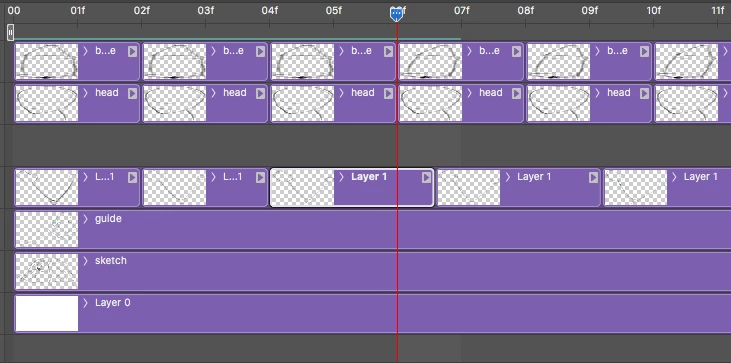
I decided to use Photoshop instead of Animate/Flash because I just prefer the feeling of drawing with the pencil. I just can't get into Animate.
I know I'm making it harder on myself because Photoshop is not really designed for animation, but if anybody can help me out that would be great!
 AdChoices