Participating Frequently
May 2, 2020
Answered

HELP: Filters affecting full image instead of only the selection?!

  • May 2, 2020
  • 2 replies
  • 2782 views

Hi everyone, this is a serious problem for me as it just stopped me from being able to do anything with Photoshop! I have never seen anything like this and wonder if there's a simple solution for this?


Basically, I have an image and I want to create a selection of it then applied a filter to that selection. Be it a filter or any color adjustment - whatever I do it affects the full image and changes don't stay constrained to the selection!!??


This just started happening in the middle of editing an image and now it works the same way with all images, even after restarting the whole computer.


I'm using Photoshop CC 2020 on a Macbook Pro. Never seen anything like it and it's driving me crazy!


Any help in resolving this is greatly appreciated!
This topic has been closed for replies.
Correct answer Bojan Živković11378569

Can you post some screenshot for clarity? Which filters you are trying to aply? Please post screenshot with document, Layers panel and filter dialogue if possible.

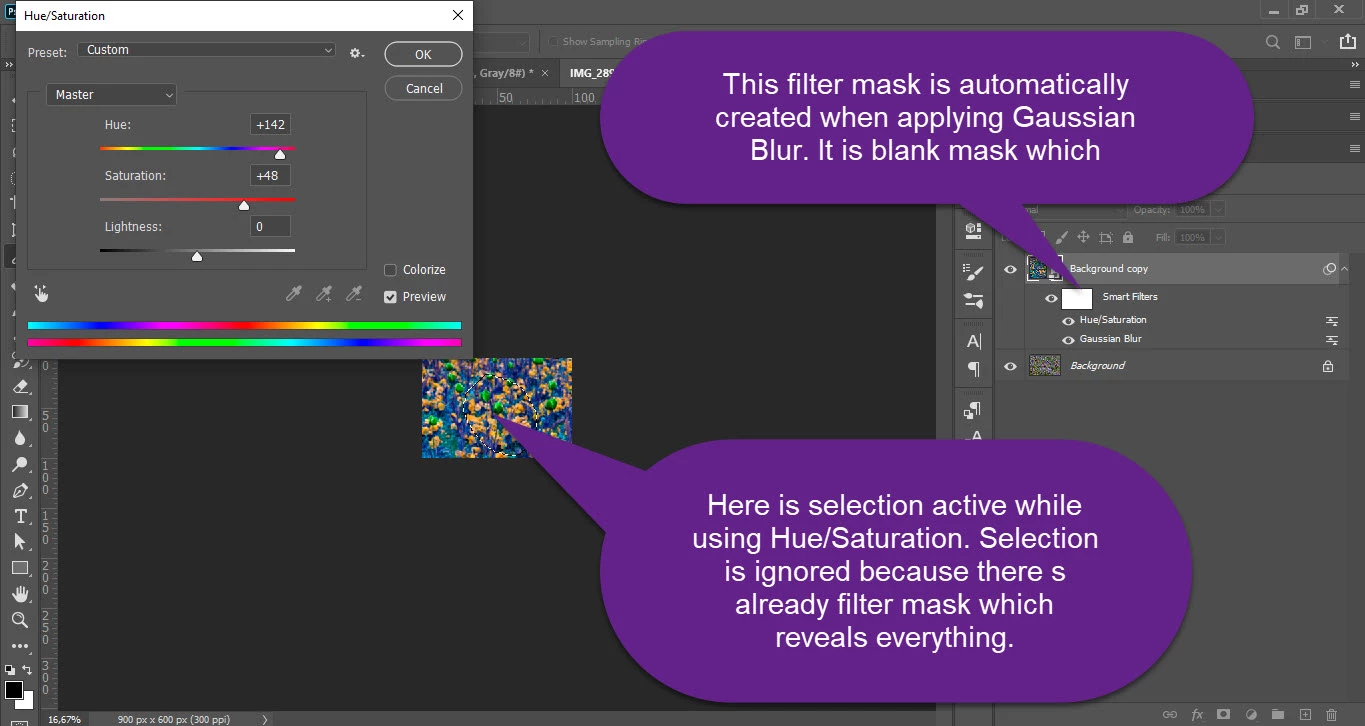
Which adjustments you are using? From Image menu? Works fine for me with pixel based layer and with Smart Object layer. When using Smart Object layer and multiple filters/adjustments you can not have multiple filter masks, by the way. If there is existing filter mask when using some filter/adjustments on Smart Object layer then selection will be ignored.


2 replies

Bojan Živković11378569
Community Expert
Community Expert
May 2, 2020

Can you post some screenshot for clarity? Which filters you are trying to aply? Please post screenshot with document, Layers panel and filter dialogue if possible.

Which adjustments you are using? From Image menu? Works fine for me with pixel based layer and with Smart Object layer. When using Smart Object layer and multiple filters/adjustments you can not have multiple filter masks, by the way. If there is existing filter mask when using some filter/adjustments on Smart Object layer then selection will be ignored.


MislavAuthor
Participating Frequently
May 3, 2020

I think you pointed at the issue here. It must have been the smart filter masking the entire layer that made it disregard the selection. I honestly cannot recreate the problem as smart filters aren't my forté. Appreciate the help and although it did come after I have found the solution by rasterizing the layer it did help me understand what the problem was.


Thank you very much!

Derek Cross
Community Expert
Community Expert
May 2, 2020

Try resetting your Photoshop preferences, which you can do under the General tab in Photoshp preferences.

MislavAuthor
Participating Frequently
May 2, 2020

Thank you. I'd rather not if that will mean losing all my new document presets unless there's no other way.


I've noticed it works as it should once I merge the layer with the background. Also if I rasterize the layer that had filters already aplied to it. (smart fliters?) Is this a normal behaviour or is it a bug?

c.pfaffenbichler
Community Expert
Community Expert
May 2, 2020

»I'd rather not if that will mean losing all my new document presets unless there's no other way.«

It well behoves Photoshop users to save and back-up all their customized presets like Brushes, Patterns, Workspaces etc.