
Participant
September 6, 2018
Answered

HELP - How to Create Photo Booth Strip Borders - Scroll Designs

  • September 6, 2018
  • 1 reply
  • 967 views

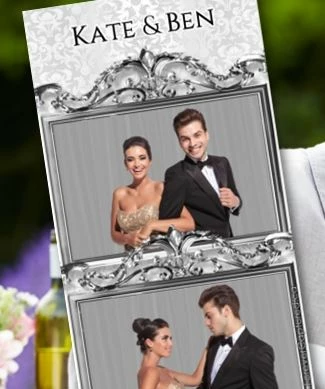
#1 I'm new to photoshop 2018 CC, I need help with how to create a border like in the picture below on a 2x3 photo booth strip, what I have found on YouTube is 8x10 border frames designs

#2 How do I create and insert  grey scrolls that are above and below in the photo below, does this includes layers ???

Please includes step by steps instructions because I have limited experiences, thanks
This topic has been closed for replies.
Correct answer JJMack

There are a countless number free Photoshop Custom Picture Frame Shape and Png picture frame on the web that you can download that you can use when you make your Photo Booth template psd. Place in the frames you like or create frame shape layers.  You should be able to find a frame you like on the web.

https://www.google.com/search?num=50&newwindow=1&ei=aFyRW8W5AabH_QaF1rMw&q=free+png+picture+frames&oq=Free+Png+Picyure+f…

1 reply

JJMack
Community Expert
JJMackCommunity ExpertCorrect answer
Community Expert
September 6, 2018

There are a countless number free Photoshop Custom Picture Frame Shape and Png picture frame on the web that you can download that you can use when you make your Photo Booth template psd. Place in the frames you like or create frame shape layers.  You should be able to find a frame you like on the web.

https://www.google.com/search?num=50&newwindow=1&ei=aFyRW8W5AabH_QaF1rMw&q=free+png+picture+frames&oq=Free+Png+Picyure+f…

JJMack