
Participating Frequently
January 18, 2021
Answered

Help on distort

  • January 18, 2021
  • 5 replies
  • 512 views

Hello


I'm trying to do something like this : 


https://www.youtube.com/watch?v=LUOPmiDUlXQ


I really can't get it to happen the way I did it for the last 10 years. I know there have been changes on the transform tool, that you have to hold ctrl or ctrl + shift to do the opposite of what we could do until now, I tried everything I just can't. I do Ctrl + T then right click > distort, then I can hold ctrl, ctrl + shift, just shift, or nothing, I can't get it to work. I have read some topics on it here but I can't make it happen sorry ...


I'm trying do put my "clean" drawing (100 % black) in the perspective of the drawing underneath (more or less). I tried Ctr + T > perspective too but I can't make it happen.
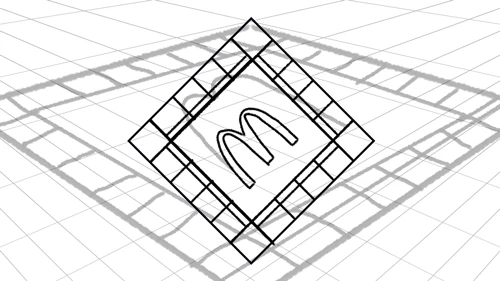


Do you have any ideas ?

This topic has been closed for replies.
Correct answer c.pfaffenbichler

I think there may be a basic misconception here, did you create the clean drawing as that parallelogram? 

If so you may have to recreate it properly with vertical and horizontal borders, then the transform points should correcpond to the »corner« points. 

5 replies

c.pfaffenbichler
Community Expert
c.pfaffenbichlerCommunity ExpertCorrect answer
Community Expert
January 18, 2021

I think there may be a basic misconception here, did you create the clean drawing as that parallelogram? 

If so you may have to recreate it properly with vertical and horizontal borders, then the transform points should correcpond to the »corner« points. 

Participating Frequently
January 18, 2021

Aha thank you a lot this was it ... So much time wasted for a stupid mistake. Thank you ! ...

c.pfaffenbichler
Community Expert
Community Expert
January 18, 2021

Well, I would be suspicious of anyone who claims never to have made mistakes … 


I recommend you convert the illustration to a Smart Object before transforming it, so you can adjust the transformation later on (if necessary) without accumulating resampling effects. 

c.pfaffenbichler
Community Expert
Community Expert
January 18, 2021

Please convert the untransformed illustration to a Smart Object and try Edit > Free Transform again. 

c.pfaffenbichler
Community Expert
Community Expert
January 18, 2021

»I know there have been changes on the transform tool, that you have to hold ctrl or ctrl + shift to do the opposite of what we could do until now«

Have you tried Photoshop > Preferences > General > Use Legacy Free Transform? 

Participating Frequently
January 18, 2021

I dint know this one thanks for the lesson. But even if I do this, when I take one corner and move it, the other corners are moving too, even if I hold down ctrl ...

c.pfaffenbichler
Community Expert
Community Expert
January 18, 2021

Mac or Windows? 

c.pfaffenbichler
Community Expert
Community Expert
January 18, 2021

»I do Ctrl + T then right click > distort, then I can hold ctrl, ctrl + shift, just shift, or nothing, I can't get it to work.«

What is the »distort« supposed to achieve? 

Once the Free Transform is invoked, one can cmd-drag the four corner points independently. 

Participating Frequently
January 18, 2021

I want to move the four corner points independantly like here : https://www.youtube.com/watch?v=LUOPmiDUlXQ


When Ctrl + T > Right click > distort and I dont hold anything, three of the four corners move together on the two axis (x;y)

When I hod cmd it changes nothing ... I can post a video if it helps.

c.pfaffenbichler
Community Expert
Community Expert
January 18, 2021

Not sure what you mean. 

As in the video the transformed Layer doesn’t even seem to be a Smart Object I would not consider it recommendable to begin with. 

c.pfaffenbichler
Community Expert
Community Expert
January 18, 2021

What is the »clean drawing«? A vector Smart Object? 

Could you please post a screenshot taken at View > 100% with the pertinent Panels (Layers, Channels, Options Bar, …) visible? 

Participating Frequently
January 18, 2021

No just a drawing made with the brush tool.

Thanks for the help.

c.pfaffenbichler
Community Expert
Community Expert
January 18, 2021

Did you not convert the clean drawing to a Smart Object before transforming it? 


Does the screenshot show the state after cmd-T? 

Could the Layer contain off-canvas content? 

Is the composite channel selected?