
Help please.. New floating document
I have downloaded the newest Photoshop CC 2017 and it does something weird whenever I try to create a new document. If I have a couple of documents already opened and copy something within an image and create a new document to paste that image onto the document, for whatever reason that document doesn't appear in the front, but appears behind all the documents that have already been opened. I have tried going into preferences, but nothing seems to fix this. Can anyone troubleshoot this? It gets a bit tedious when I have 10 documents opened and have to ctrl+tab all of them to get to my new document. Here is a screenshot of what I
mean:
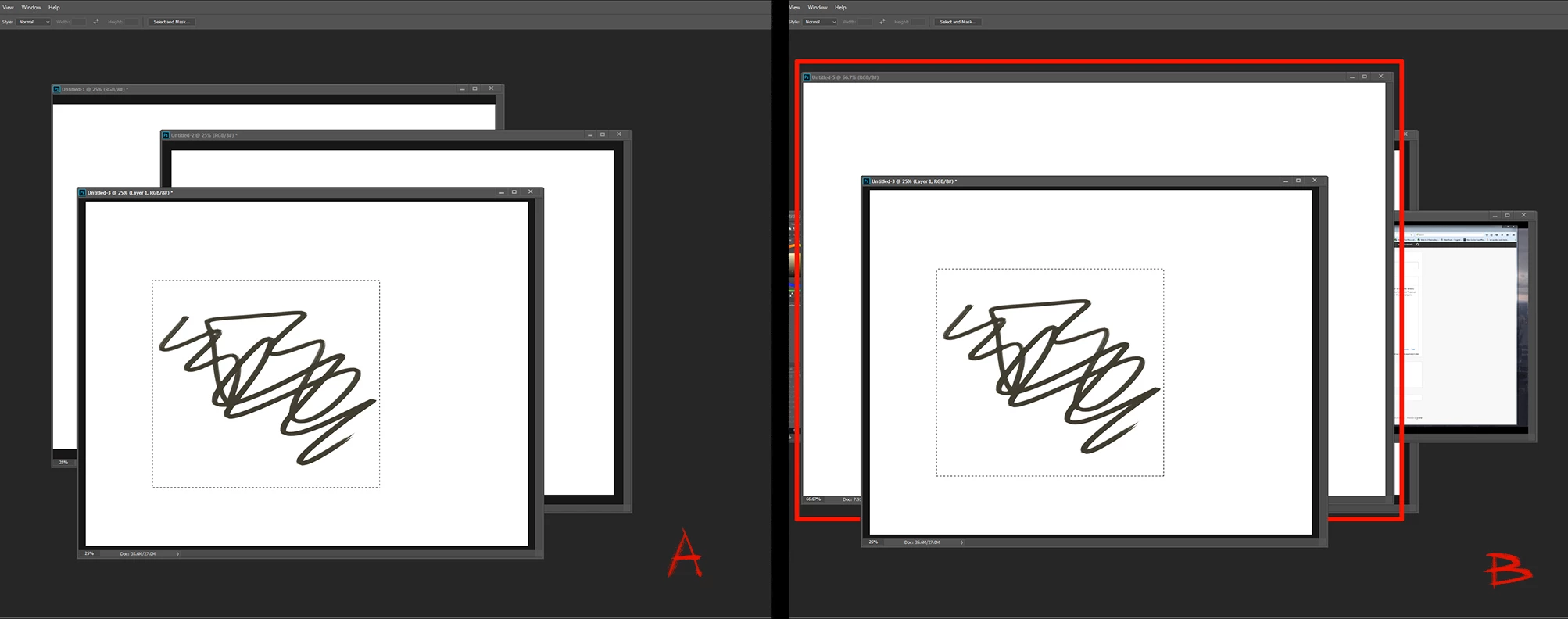
I have 3 documents opened. If I try and copy what's in the marquee(A) and create a new document to paste that in, the document opens behind the original that it was copied from(B). Is there any way to keep that new document in the front? You can only imagine how troublesome it can be if you had 20 documents and have to ctrl+tab just to get to the new document. I hope I am making sense. Thanks!
 AdChoices