We Run Hollywood!
Known Participant
March 17, 2019
Answered

Help removing pattern from Dress

  • March 17, 2019
  • 7 replies
  • 9658 views

Hey Everyone,

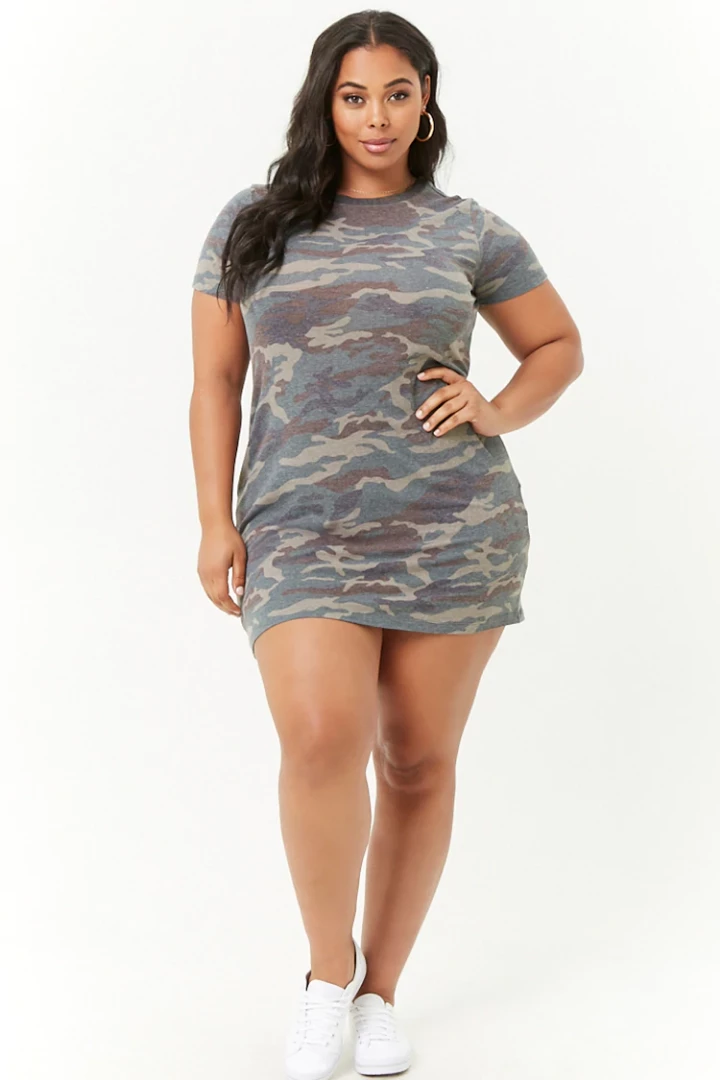
Would someone please explain to me the MOST REALISTIC way to remove the camouflage pattern from this dress? I don't care how meticulous and time-consuming the process will take! I want it to look like the camouflage pattern disappeared from the dress.  THANK YOU FOR YOUR HELP!!!!
Correct answer c.pfaffenbichler

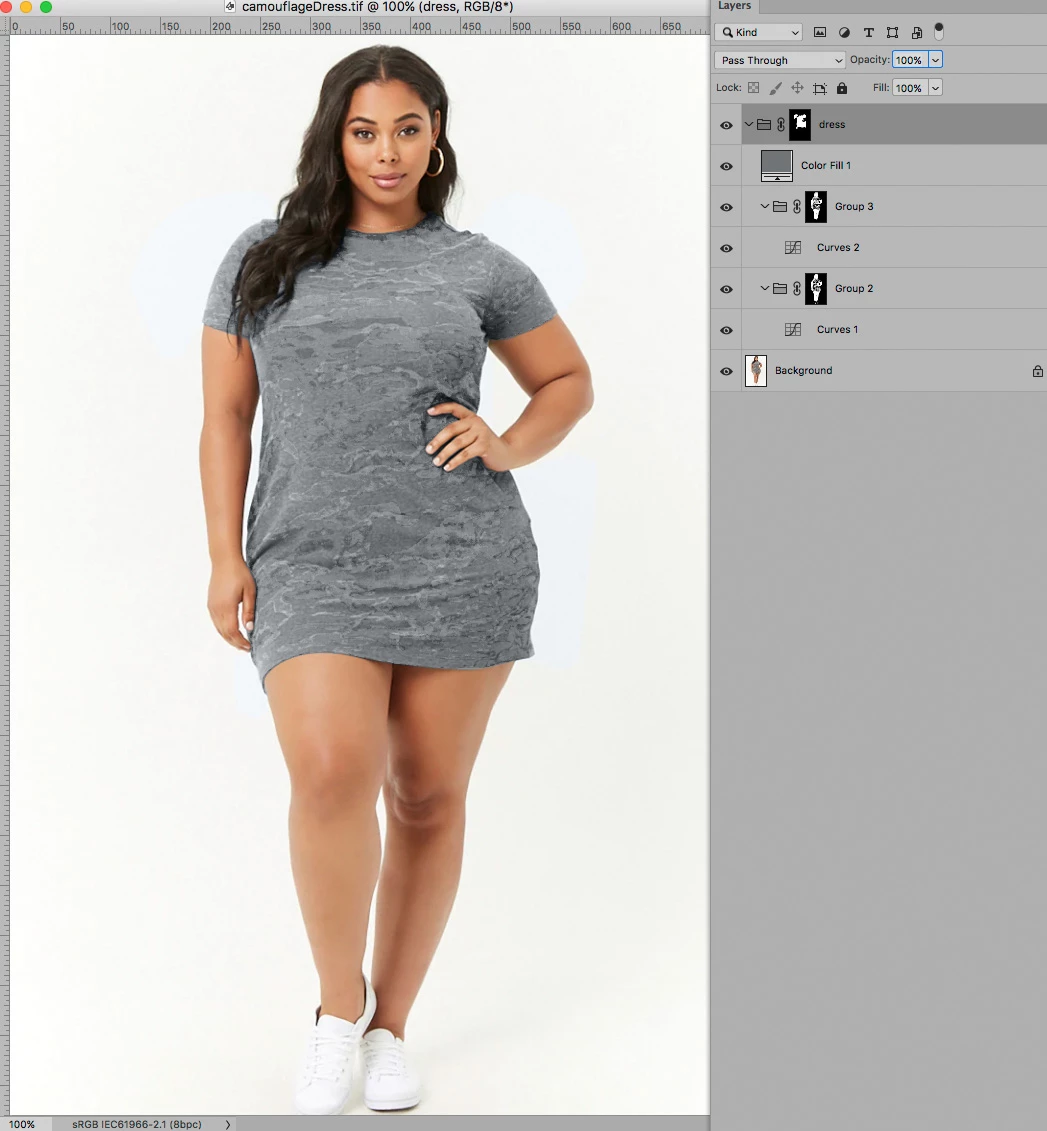
I think some painting may ultimately be unavoidable, but as Mylenium mentioned the Blend Mode »Color« can be very useful here.

I think a fairly decent Mask of the dress and then Masks to edit the differing luminance of  the various colors on the pattern with Curves Layers can provide a basis on top of which to do the necessary remaining touch-up. 

To creat Masks for the colors it might be useful to create a copy of the image in Lab mode and us the a- and b-Channels.

7 replies

c.pfaffenbichler
Community Expert
Community Expert
July 6, 2023

Care to elaborate? 

Participant
August 29, 2021


Select the dress, raw camera filter: remove texture, remove clarity, remove luminance noise with 0 detail, accept and close camera raw. Then apply again same process with camera raw and again and again till textures are gone.. Play with levels etc to find the effect you prefer.

Participant
July 22, 2019

Hello !

Can you please give me more details on how you did remove the patterns from the dress? Im very new to using PS and I don't understand quite well how I can do this...

Please I need you to explain how I can make this dress color solid without having any pattern on it... would be very helpful!

Thank you so much in advance

c.pfaffenbichler
Community Expert
Community Expert
July 23, 2019

With patterns like this I see no even halfway efficient option to achieve that result.

Participant
July 23, 2019

Thank you for taking the time to answer my question !

Norman Sanders
Legend
March 17, 2019

I'm with you on the current drive to create Barbie dolls. You may recall the fuss we both made some time ago when the OP asked how to remove the freckles. I think I referred to the original having a "stop press" quality and only reluctantly went on to show an attempt at solution. Still prefer the original. (I think that the CMYK Cyan channel was used as a Luminosity layer in the RGB file along with a Curve adjustment.)

D Fosse
Community Expert
Community Expert
March 17, 2019

Yes, I certainly remember that one, Norman. I still think it's a gorgeous shot.

D Fosse
Community Expert
Community Expert
March 17, 2019

Yes, Norman, I see what you're getting at - but there's another side to this, which I think is very important.

Actually I was going to edit my post to "I don't think that looks any more natural". Because that was my concern. More real people, not fixed-up ones to the point where you're not even sure they have a pulse.

That image is making a point, it's taking a clear stand. It's about time. It feels wrong to water it down and take the punch out of it.

Norman Sanders
Legend
March 17, 2019

Agreed. I, too, have had my fill of plastic people. What we have here, I think, is an unnecessary distraction. My quick attempt (intentionally avoiding a "How to" method in order to mute it} is not the point. My quarrel, as presented in my first post, is with the original photography.

D Fosse
Community Expert
Community Expert
March 17, 2019

Right. We had different fish to fry here, it seems. Mine's all good now, so I'm ready to listen to yours

Isn't it great when an image can spark an actual discussion, instead of just passive consumption? There's hope for the photographer's trade

c.pfaffenbichler
Community Expert
c.pfaffenbichlerCommunity ExpertCorrect answer
Community Expert
March 17, 2019

I think some painting may ultimately be unavoidable, but as Mylenium mentioned the Blend Mode »Color« can be very useful here.

I think a fairly decent Mask of the dress and then Masks to edit the differing luminance of  the various colors on the pattern with Curves Layers can provide a basis on top of which to do the necessary remaining touch-up. 

To creat Masks for the colors it might be useful to create a copy of the image in Lab mode and us the a- and b-Channels.

Norman Sanders
Legend
March 17, 2019

Photographing this woman from a vantage point of approximately navel level is unkind. Enough said.

D Fosse
Community Expert
Community Expert
March 17, 2019

Huh? With respect, Norman, I don't think that is an improvement. The fashion industry has gone way too far, and I thought this image was a very refreshing comment on that.

On principle, I think all this photoshopping of models, to make them all look identical, should simply stop. I stirred up some angry voices when I said so in one of the Liquify-threads recently, but I stand by it.

Mylenium
Legend
March 17, 2019

Could be as easy as brushing over using the Color blending mode and sampling the colors from the surroundings. You just may require a few duplicate layers and feathered masks due to the top being brighter than the bottom and some additional tweaks likely being necessary after the initial brushing.

Mylenium

We Run Hollywood!
Known Participant
March 17, 2019

Mylenium,

Thank You for taking a moment to give your amazing feedback, truly appreciated!!! Thanks again!!!