
Participant
August 28, 2018
Question

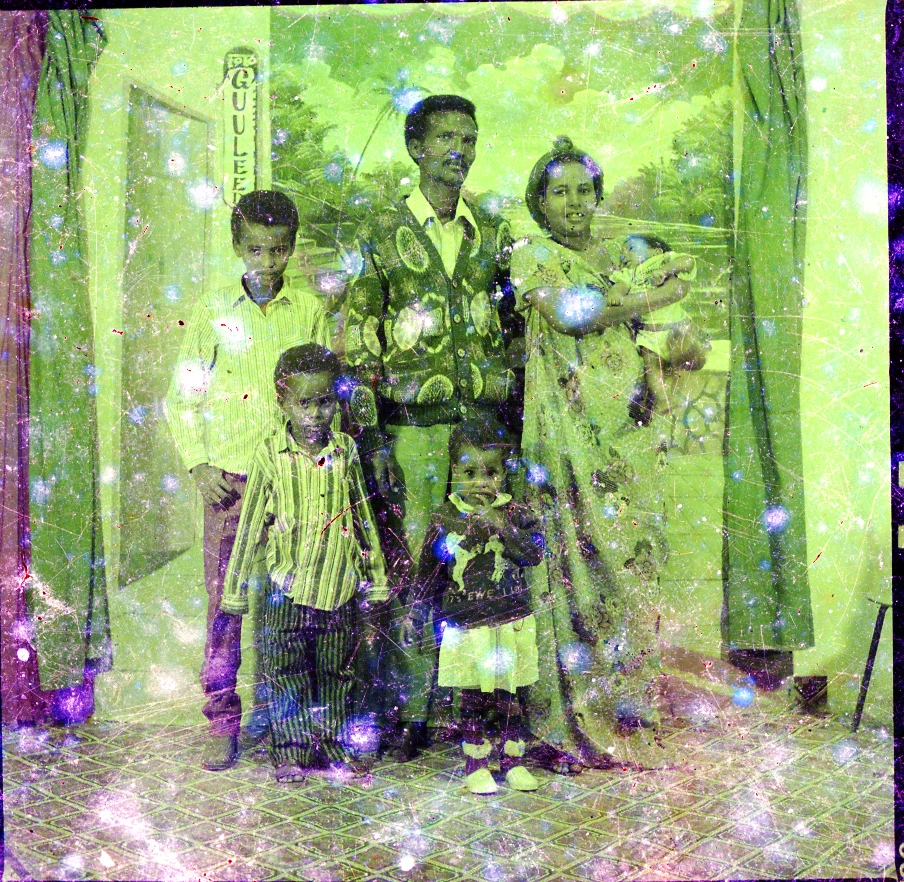
Help restoring original colours to this photo?

  • August 28, 2018
  • 5 replies
  • 3454 views

Hi there, someone as asked me to restore this photo for them and I have no idea how to go about fixing the colour in it. They do not want it converted to black and white, instead they want the original colours brought back (and obviously the green and magenta casts gone). If anyone could walk me through ways to restore the colour in this photo I would be very grateful. Thank you! (P.s. I use Photoshop CC. Also before it is brought up, I cannot scan the photo in again as I do not have it, this is what they gave me (a digital, jpg and a tif at this resolution) and we do not have access to the original negative)
This topic has been closed for replies.

5 replies

sharp_hands16B8
Community Expert
Community Expert
August 29, 2018

Often a color cast will still have hints and shades of the original hues in it.

This doesn't appear to have enough to recover with traditional color correct in Levels/Curves, etc. I think you're going to have to take the time, convert it to black and white. And then create a layer and set it's blend mode to Color. Do this for each component of the picture. Think "Skin" "clothes" etc... Now paint in the color you want to get a solid base color for the photo. Now you can go back an shade the picture with additional tones and stack layers above the base color layer.

Trevor.Dennis
Community Expert
Community Expert
August 29, 2018

Do you know what?  I'd go ask on Retouch Pro.  They are a site cleverer that us at this sort of thing.

https://www.retouchpro.com/

[EDIT]  I just checked it as a B&W and it is none too flash, so I'd give them a much higher resolution version of this picture to play with.

Semaphoric
Community Expert
Community Expert
August 28, 2018

I agree with Theresa. Use the Channel Mixer to put the green channel into the red and blue, and had color.

Theresa J
Community Expert
Community Expert
August 28, 2018

You are going to have to get creative and guess at what the original colors were, and then hand paint them back in. The original colors are pretty much gone from this scan.

Sahil.Chawla
Adobe Employee
Adobe Employee
August 28, 2018

Hi there,

As you're looking to restore and old image and color correct it, please have a look at this video and let us know if it helps: How to Repair and Colorize Old Photos (Photoshop CC Tutorial) - YouTube

Regards,
Sahil