Participating Frequently
March 14, 2023
Answered

Help with saving a Photoshop file

  • March 14, 2023
  • 4 replies
  • 1849 views

Hi,
I'm working on an existing photoshop file,
And when I press control S,
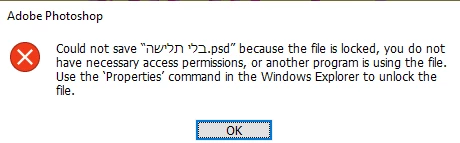
He writes me a message as you can see in the attached picture.
I would appreciate it if you could help me what to do.

 

This topic has been closed for replies.
Correct answer Kevin Stohlmeyer

Yes, it saves in C


Then you have a permissions issue unique to your D drive - this isnt something Photoshop can resolve.

4 replies

YAEL4566Author
Participating Frequently
March 14, 2023

This is what I'm doing now.
But it is not wise to save as an additional file every time

YAEL4566Author
Participating Frequently
March 14, 2023

on a computer storage medium

Kevin Stohlmeyer
Community Expert
Community Expert
March 14, 2023

What do you mean "on a computer storage medium"? Specifically - are you saving to your local C: drive, a server, etc?

YAEL4566Author
Participating Frequently
March 14, 2023

Can you move a file to your local C: Drive - try opening and saving from there?


I can do it, but I don't want to overload the C drive, so I save these works in D

Kevin Stohlmeyer
Community Expert
Community Expert
March 14, 2023

Hi @YAEL4566  where is the file located?

Ged_Traynor
Community Expert
Community Expert
March 14, 2023

Have you tried doing a Save As and calling it a different name