
Jason Burnett
Inspiring
November 4, 2019
Question

Help with Units and Accuracy

  • November 4, 2019
  • 5 replies
  • 699 views

I am really frustrated by the strange way in which Adobe Illustrator deals with resolution versus the way that Photoshop does and I need some advice.


First, it seems like common sense to me that if I create a document in any program and measure an object to be 1" wide, I should be able to cut that object and paste it into another program by the same company and have it show up 1" wide. And if the resolution of one program was set to 300 and the other was 150, I would totally not have a problem if the 300dpi image I posted into the 150dpi document was 2x as big. But it is never that easy and I don't understand why? 

Furthermore, if I set my document raster effects in Illustrator to match my Photoshop dpi, it still doesn't work. How can this be? How can I create an accurate and correctly sized shape that I can paste in Photoshop at 100% scale and have it be the correct size?


Here's an example. Two documents one in Illustrator one in Photoshop:

In Illustrator, I create a 200px by 200px square in the center of my artboard

I copy the 200px by 200px shape in Illustrator and Paste as a Smart Object in Photoshop.

The resulting shape at 100% scale is now 897 px square...not 200px. Of course, it's 4.48x bigger in Photoshop why not? 
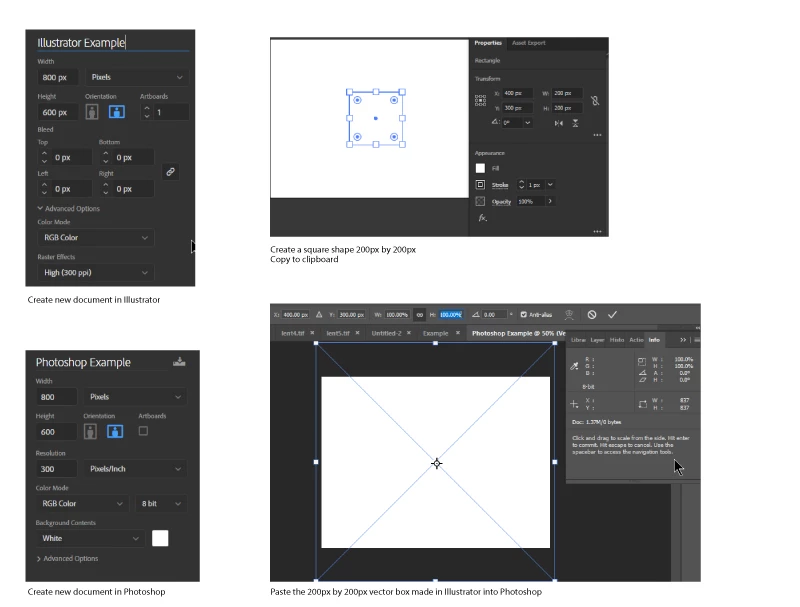
 

This may seem trivial, but what I am really trying to do is to stripe 6 images vertically so that each image strip is 8px wide and repeated every 48px then output at 1440dpi.

8px per image x 6 images =48px per lenticule at 30 lenticules per inch, that's 1440dpi which my printer can output. How can I do this in Photoshop since importing the precision mask I made in Illustrator won't work? 

This topic has been closed for replies.

5 replies

jane-e
Community Expert
Community Expert
November 11, 2019

“I am really frustrated by the strange way in which Adobe Illustrator deals with resolution versus the way that Photoshop does and I need some advice.”


Illustrator is resolution independent. It can be scaled 100 times bigger or to one tenth of the size. The only places you see resolution in Illustrator is for the raster effects, such as drop shadow and Gaussian blur, and that is set in the Effects menu because it is only for raster effects and nothing else. Images that are placed in Illustrator will retain their resolution when they are placed at 100%.


The vector art that you create in Illustrator has no resolution. Resolution is pixels per inch, and we aren’t working with pixels.


What I do is create a file in Illustrator using the same pixel width and height as my PS file. Then I either draw or I copy and paste my Illustratror artwork to the correct scale. Then I do one of several things, depending on what works for my project:


  • If the image is embedded, I sometimes leave everything in Illustrator and update the link to PS if needed.


  • Place the Illustrator file into PS as a smart object, hiding the PS background (PS) layer, so I can make the edits in Illustrator. Including the PS layer and hiding it makes the Illustrator artwork appear in the correct location.


  • Drag and drop the Illustrator artwork to PS.


  • On occasion, I export the Illustrator files to PS layers because I want to do things in PS that I can’t do in Illustrator.


I think I’ve done some other things, but that’s all that occurs to me at the moment..


~ Jane


gener7
Community Expert
Community Expert
November 4, 2019

To add to this, if you want a screen inch to equal a physical inch, you need the screen resolution.

My display is set at 1280 pixels horizontal and and the screen is 11.25 physical inches horizontal.

1280/11.25 gives 113.77 pixels per inch, except that pixels are integers, not fractions. So we round to 114 ppi


In Photoshop Preferences, I go to Units and Rulers and enter my custom value as shown:


Then as Dave mentioned, that will allow View > Print Screen to set the zoom level so that a screen inch as shown by the onscreen rulers (ctrl/cmd r) matches a physical ruler.


I'm speaking for Photoshop, I don't how this is done in Illustrator.

davescm
Community Expert
Community Expert
November 4, 2019

100% in Photoshop is not related to a physical size on screen. It means 1 image pixel mapped onto 1 screen pixel.

To view the physical size in Photoshop, you need to set your monitor screen resolution in Preferences, then use View - Print size.

Illustrator works differently as it is a vector based program not a pixel editor.

Dave

Jason Burnett
Inspiring
November 11, 2019

Okay, apparently everyone got caught up on the fact that I said: "Pasted at 100%". It's important to understand that I meant 100% scale of the pasted content. Not 100% view on the screen in Photoshop.

If I create a document in Illustrator that is 300px x 300px and try to open it in Photoshop, why doesn't it know that my document is 300px x 300px? And why does it guess 893px x 893 px? This is a complete failure in my opinion. If a document is set to a certain size, all apps should honor that size.


There needs to be some way to go from Photoshop pixels to Illustrator pixels and back without this random size change. Who benefits from this? Why is this a feature and not a bug?


davescm
Community Expert
Community Expert
November 11, 2019

If you look carefully when you create a document in Illustrator in inches and change the input to cm or mm the conversion uses the standard 2.54 cm 25.4 mm to the inch. Converting to pixels uses a standard 72 ppi (regardless of the raster effects setting)

When you copy then paste into Photoshop it comes across with a physical size and is converted back to pixels. So you would need to set Photoshop to a matching 72ppi to get the same pixel size in Photoshop


Dave

D Fosse
Community Expert
Community Expert
November 4, 2019

That's right. This is the fundamental and inherent difference between a vector-based application working with physical dimensions, and a raster-based application working with pixels.


Ai doesn't really know what a pixel is. Photoshop doesn't really know what "size" is. They can only work with these parameters through secondary workarounds and metadata.

Chuck Uebele
Community Expert
Community Expert
November 4, 2019

I've had the same issues, but found that IA really doesn't use pixels. You can't set a document to a pixel size. If you use 72 PPI in IA, it translate to PS at 72 PPI, and alls good with the world. Any other PPI with IA, you'll run into issues.