


Known Participant
May 3, 2017
Answered

Hex Codes in Photoshop?

  • May 3, 2017
  • 6 replies
  • 100686 views

Hello!

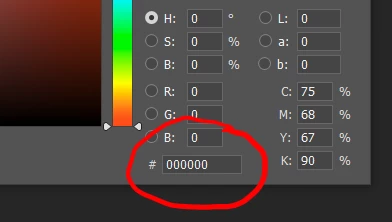
I'm currently trying to follow a Bob Ross painting video (yes, I am that bad, but he makes it so much easier) and he lists the colors he uses at the start of the video. I have all of the hex codes for that supposed "exact" color in terms of digital art, but I can't find where to enter it in photoshop. Could anybody give me a hand? Thanks!

Correct answer Semaphoric

It's at the bottom of the Color Picker:


6 replies

Participant
August 27, 2022

So I was confused for the longest time I was in 32-bit and there was no hex code I since changed to 8-bit and it has magically appeared but now I don't know why that is. to my understanding 8-bit is a lower quality but that all I know.


oh and its under image>mode if someone is wondering how to change over to get hex codes.

davescm
Community Expert
Community Expert
August 27, 2022

Hi

Hex codes are just RGB numbers expressed in Hexadecimal. So instead of 0 to 255 you have 00 to FF.

Incidentally both are meaningless unless expressed in the context of a particular colour space. So the same numbers in decimal or hex, represent different colours in sRGB, Adobe RGB, Prophoto. I add this only because many people think that a Hex code is less ambiguous that a set of RGB decimal values. They are equally accurate or inaccurate depending on whether the color space is given.


To the other part of your question. 8 bit and 16 bit integers represent the same range of values but 16 bit divides that range into smaller increments.  However 32 bit floating point numbers are very different. They represent an extended dynamic range and have the capability to express darker values than can be represented by 8 bit 0, and lighter values than can be represented by 8 bit 255 (or FF in hexadecimal). As such, hex codes have no place in 32 bit/channel.


Dave


Participant
September 3, 2023

Interesting conversation. I for one have never heard anyone in his right mind use HEX code to describe anything but sRGB colours.
HEX codes are used for screen colour only. For physical media, LAB is used to describe a colour in technical terms, - so it can be reproduced correctly.
If you replace a HEX code with a generic RGB value however, you ARE in trouble, since in this case, - if this is for instance used in a brand manual to describe the colour of a brand, the RGB value could just as well be picked up by the designer when he or she is working in Adobe RGB mode preparing a job for print - and trust me, I have seen this in lofty brand manuals created by big advertising agencies who should know what they are doing.
A single RGB value is about as useful as presenting a print colour with a single CMYK value, without referring to a print standard - say Fogra 39 or Gracol xxx (if you are American). 

I for one strongly recommend using the HEX code to describe web colours. 

Participant
October 29, 2021

I am in the latest version of Photoshop, using 16 and 8 bits, and there is no way I can add my HEX code.

Legend
October 29, 2021

Yacine,

1. Tell us the actual version of Photoshop please. Not "latest"

2. Please show a screen shot of your colour picker, when in RGB 8 bit mode. 

Participant
October 29, 2021

Sorry I found. It was my mistake.

jane-e
Community Expert
Community Expert
October 23, 2020


In addition to being at the bottom of the Color Picker, you can use the Color panel and set the sliders to Web Color Sliders to get Hexadecimal. Note that you can then copy the code from the menu and paste it into your web application.


~ Jane


Tina-Soulelle
Participating Frequently
July 13, 2020

In the Photoshop 2020 this lovely hex code in the bottom has disappear and I wonder why? I really need this  when I'm working with the color.

davescm
Community Expert
Community Expert
July 13, 2020

Are you working in 8 bit or 16 bits/channel ?

If you are in 32 bit linear then a different colour picker is used and hex codes would be completely meaningless in such a colour space.


Dave

Tina-Soulelle
Participating Frequently
July 13, 2020

I am working in 8 bits/ channel.

D Fosse
Community Expert
Community Expert
May 3, 2017

Hex is not "exact". People believe that, but it's a misunderstanding. In reality it's just a different notation for RGB values.

If you want exact, hex color is subject to the same requirements for proper color management. A given hex number is undefined until you assign a color space to that number. Only then does it refer to a specific color.

However, a safe assumption with hex is that it refers to sRGB. Hexadecimal notation has its origin before modern color management, and it was used as a convenient way to refer to screen colors.

The only reason I can think of why hex has survived, is that it has a geeky, computerish sound to it. It sounds like it should be accurate. Today it's really outdated.

Participant
June 23, 2019

While it is true that hex codes do not encode "all" colours, they do contain every colour that your screen can do, assuming that you don't have a non-sRGB monitor. A hex code has the possibility of 16,777,216‬ different colours and survives because it is incredibly useful in many applications in computing and web design. Saying that its outdated is like saying that the PNG image format is outdated; they were both created in 1996.

All for all, I bet that you cant give me a format for exchanging exact colours as compact and universally understood as hex codes. If I tell someone that something has a colour of #4b25c3 then it is quite commonly understood. Probably much to your dismay, the hex code will live on.

D Fosse
Community Expert
Community Expert
June 24, 2019

You misunderstand. It's not that hex isn't used; it's that it's undefined. Hex came into use before modern color management, as a convenient way to refer to screen colors. That was all one could do back then.

Hex is just RGB with a base 16 notation, instead of base 10. Otherwise it's the same.

Hex DE7518 produces one color in sRGB; a completely different color in Adobe RGB. Try it for yourself.

The problem is that hex still carries the expectation that it refers to a certain, specific color. That's how it has historically been used, and that's how people still use it. But it doesn't! It was just the best they had back then. That's why it's outdated. Color management uses RGB notation.

Semaphoric
Community Expert
SemaphoricCommunity ExpertCorrect answer
Community Expert
May 3, 2017

It's at the bottom of the Color Picker: