

TenTin
Known Participant
June 30, 2023
Answered

Hide Photoshop Scratch File!

  • June 30, 2023
  • 2 replies
  • 595 views

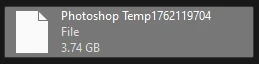
Is there a way to hide the Photoshop scratch file? A file with such a "Photoshop Temp#####" name pattern on the scratch disk. Ai has a temp folder that can be hidden, and we can't see it on the scratch disk when we are working with Ai.
This topic has been closed for replies.
Correct answer D Fosse

Actually, partitions aren't recommended either. It won't do any harm, except restrict free space usage, but there's absolutely nothing to gain either.


In the old days, when we had spinning drives with only one physical read/write head, the advice was to put scratch disk on another physical drive (not partition). That recommendation has stuck around to this day, but with SSDs there's no reason for it anymore. The official recommendation today, for best performance, is to put it on the system drive (if you have enough space).

2 replies

D Fosse
Community Expert
Community Expert
June 30, 2023

If you absolutely don't want to see it, put primary scratch disk on the system drive. Then it goes to the Windows TEMP directory. Then assign your current drive as secondary scratch if you have space issues.


Normally, you get the best performance with the scratch disk on the system drive (assuming that's your fastest drive, which it usually will be).


As Trevor points out, the scratch files go to the root of any non-system drives you assign scratch to.

TenTin
TenTinAuthor
Known Participant
June 30, 2023

My only concern is the file appearing in the root of the D partition when I browse the partition.


Thanks. Interesting! I didn't know that. As I heard/read before it is better to set SD (Scratch Disk) on the non-OS partition (like drive C that Windows is installed on). I have two partitions (SSD), and I always have set the D partition as SD. As you said, I changed it to C drive, and the TEMP file goes in the "%temp% folder! Are you sure it's better to set C drive as SD? If yes, I also will change the Ai SD to C.

D Fosse
Community Expert
D FosseCommunity ExpertCorrect answer
Community Expert
June 30, 2023

Actually, partitions aren't recommended either. It won't do any harm, except restrict free space usage, but there's absolutely nothing to gain either.


In the old days, when we had spinning drives with only one physical read/write head, the advice was to put scratch disk on another physical drive (not partition). That recommendation has stuck around to this day, but with SSDs there's no reason for it anymore. The official recommendation today, for best performance, is to put it on the system drive (if you have enough space).

Trevor.Dennis
Community Expert
Community Expert
June 30, 2023

Your only control is the drive you chose.  The scratch Temp files will reside in the root directory of that drive.  The only time you would have any reason to interact with it, is if you are worried that a temp file was left behind if Photoshop did not shut down properly.

TenTin
TenTinAuthor
Known Participant
June 30, 2023

I knew that.