
Answered
Histogram issue - Photoshop
On the histogram. The black values are on the right hand side, and white on the left, how do I get it back to what it should be, i.e. black on the left?
Thanks
Steve
{Thread renamed by moderator}
On the histogram. The black values are on the right hand side, and white on the left, how do I get it back to what it should be, i.e. black on the left?
Thanks
Steve
{Thread renamed by moderator}
What is the color mode of your document?
The display of the values in the Histogram panel depends on the color mode. For RGB, CMYK, and grayscale modes, the left side always means minimum and the right side always means maximum. For example:
If the direction of the histogram is consistent with the color mode, it’s working correctly.
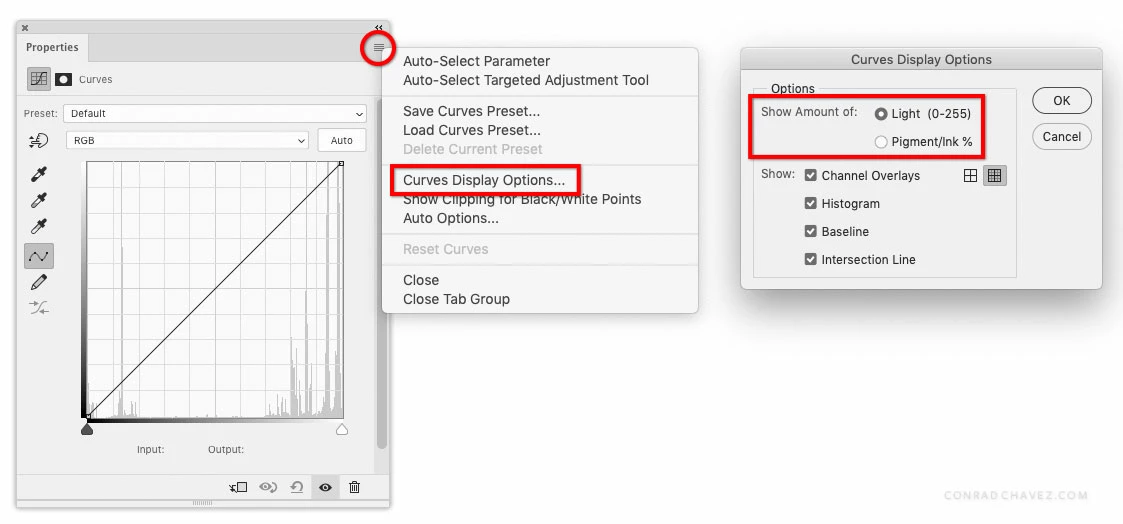
If you’re looking at the Properties panel for a Curves adjustment layer, you can use the Curves Display Options dialog box to reverse the direction of the histogram. In the “Show Amount Of” option, choose Light (0-255) or Pigment/Ink%.
Already have an account? Login
Enter your E-mail address. We'll send you an e-mail with instructions to reset your password.
 AdChoices