
Participant
June 13, 2019
Answered

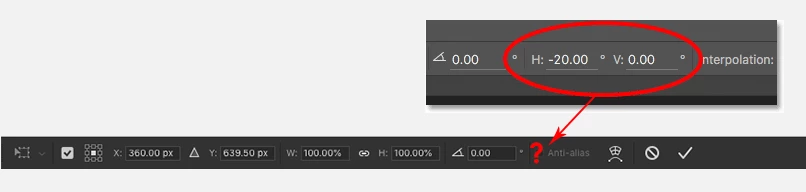
Horizontal (H) and Vertical (V) skew fields are missing in the Options Bar on Photoshop CC 2019
  • June 13, 2019
  • 2 replies
  • 7502 views

Does anyone know what happened to The Horizontal (H) and Vertical (V) Skew fields in the Options Bar, and how to get them back, on Photoshop cc 2019?

Anyway, I revert to the legacy transform behavior by creating"PSUserConfig.txt" file in the Photoshop settings folder with the following line.

     TransformProportionalScale 0

This can be the reason for that issue? have any idea? Please help me.

Thanks

This topic has been closed for replies.
Correct answer davescm

Have a relook. The options bar (with skew missing)  in your first image shows the options bar for transforming a smart object. You can still Skew but the boxes are not in the options bar. I just checked and CC2018 was the same.

The skew boxes do appear appear though, in both versions,  when transforming pixels, paths and shapes.

Dave

2 replies

JJMack
Community Expert
Community Expert
June 13, 2019

Perhaps it has to do with what you are transforming....

JJMack
Participant
June 15, 2019

Ohh. But why it's not supported for Smart objects?

davescm
Community Expert
Community Expert
June 15, 2019

namals61140102  wrote

Ohh. But why it's not supported for Smart objects?

You can skew SO's, using Edit >Transform >Skew,  just not from the options bar.

As to why the option bar is different, no-one here can answer that one as we do not work for Adobe. You could put in a feature request here:

Photoshop Family Customer Community

Dave

June 13, 2019

Hi

They're showing up for me CC2019 and I have reverted to the legacy transform

Have you tried resetting Photoshop preferences

Participant
June 13, 2019

Yeah. It works. After Reset Preferences On Quit, it came back.

Many thanks for your help Ged Traynor

davescm
Community Expert
davescmCommunity ExpertCorrect answer
Community Expert
June 13, 2019

Have a relook. The options bar (with skew missing)  in your first image shows the options bar for transforming a smart object. You can still Skew but the boxes are not in the options bar. I just checked and CC2018 was the same.

The skew boxes do appear appear though, in both versions,  when transforming pixels, paths and shapes.

Dave