Participating Frequently
March 31, 2023
Question

Hot Key For Fill not Working Because of My Keyboard

  • March 31, 2023
  • 1 reply
  • 947 views

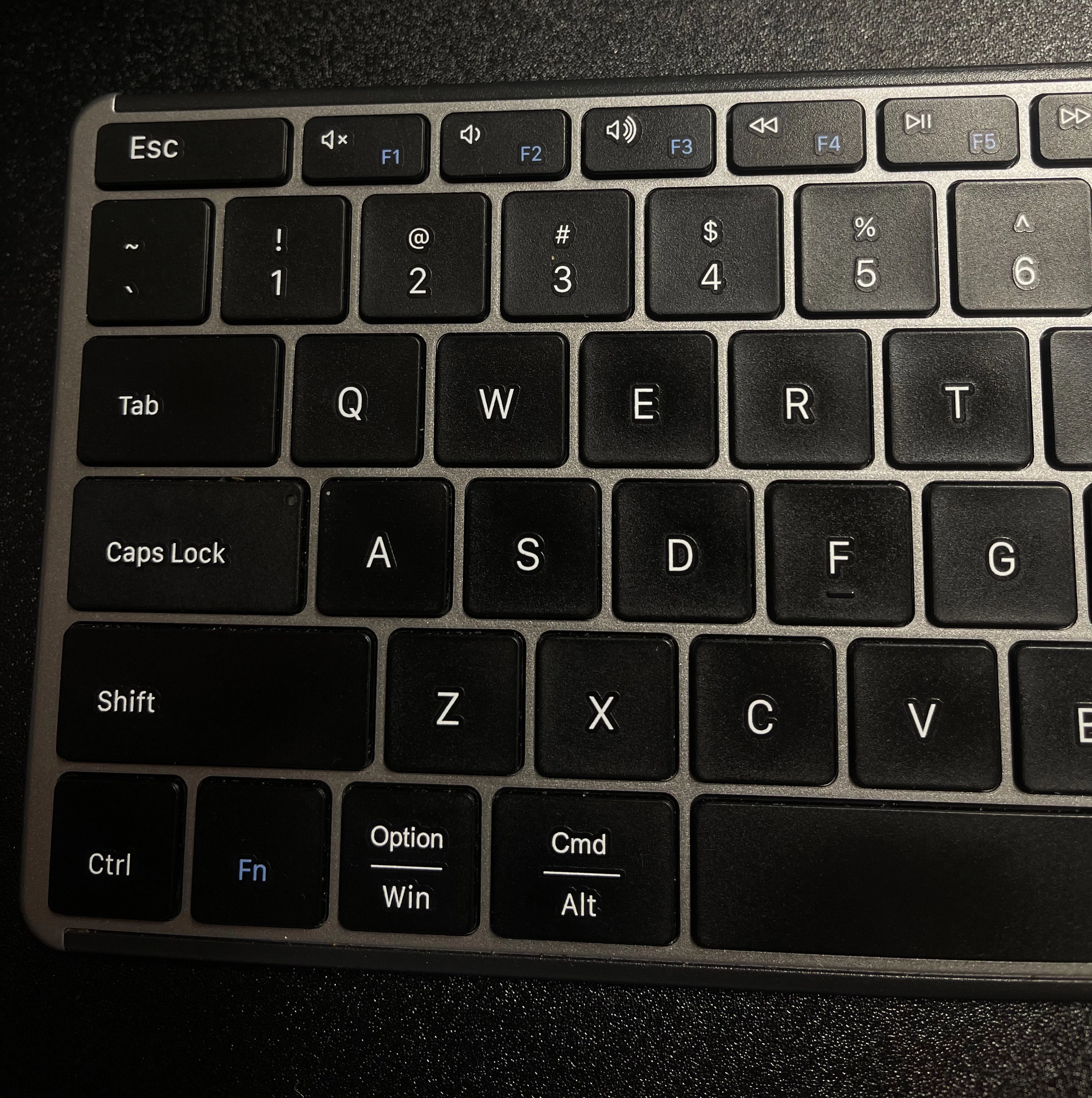
Hello Im trying to use the content aware in the fill feature. Everytime I hit shift F5 it just plays a video from youtube if youtube is open. If youtube is closed it doesn't do anything. 


How can I fix this so I can use the hotkey to use Fill in the edit menu?
 

This topic has been closed for replies.

1 reply

Sameer K
Community Manager
Community Manager
April 3, 2023

Welcome to the Photoshop Community @ruben2420550636wp. Thanks for sharing the photo of your keyboard. It clears things up.


The function (Fn) mapped to the F5 key of your keyboard is to media play/pause. Try pressing the Fn key (between CTRL & Opt/Window) when you press F5 & it should work as expected.


In most cases, you should be able to switch this around by enabling Fn lock mode by pressing the Fn key with the CAPS Lock.


Let me know how it goes. Thanks!
Sameer K

jane-e
Community Expert
Community Expert
April 3, 2023

In most cases, you should be able to switch this around by enabling Fn lock mode by pressing the Fn key with the CAPS Lock.

By @Sameer K


@ruben2420550636wp 

You tagged yourself as Windows in your post, but that looks suspiciously like a Mac keyboard.

  • On macOS, switching the Function keys is always in the same place in System Preferences on every Mac..
  • On PCs, it is not part of the OS; it's part of the computer and the method changes depending on the vendor. For me with my current laptop, it's Ctrl + Escape. You have to look it up for your model.


Jane

Participating Frequently
April 3, 2023

Hi Jan-e I bought this keyboard because it works with both mac and windows.