Participant
November 26, 2021
Question

How can I change opacity of pattern in stroke

  • November 26, 2021
  • 4 replies
  • 682 views

Hello,

I am trying to change the opacity of pattern in stroke of text. (I don't want to change opacity of stroke)
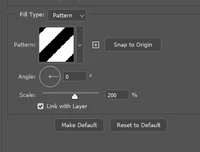
Regards, Daniel

This topic has been closed for replies.

4 replies

Participant
November 26, 2021

I'll try to explain again. I am trying to change opacity of pattern. There's opacity in structure options but not in pattern.

I don't want to opacity whole stroke, only the pattern.

Bojan Živković11378569
Community Expert
Community Expert
November 26, 2021

Well, if you are using pattern as stroke then stroke itself is pattern and vice versa, isn't it? Or I am understanding wrong what you want?

Participant
November 26, 2021

Well, if I change opacity of stroke then it changes the transarency of whole stroke and I want to change transparency of pattern that in stroke only.

Trevor.Dennis
Community Expert
Community Expert
November 26, 2021

Another possibility is to use Create Layers 

Right click the stroke and choose Create Layer

This will turn the layer styles into separate layers that you can manipulate individually.  The big disadvantage with this approach is that it is destructive.  You can no longer edit the layer style as in you can't go back.

Jeff Arola
Community Expert
Community Expert
November 26, 2021

Are you wanting to make the white areas of the pattern transparent (show the layer below)?

PECourtejoie
Community Expert
Community Expert
November 26, 2021

In this case, set the Blending mode of the pattern to Multiply, then reduce the Fill of the layer in the Layers panel (do not reduce its Opacity, unless you want to affect also the opacity of the layer styles)

Bojan Živković11378569
Community Expert
Community Expert
November 26, 2021

One solution is to resave pattern with lowered opacity. How to do that? Determine pattern dimensions by hovering mouse over it. Create new document at pattern dimensions and apply pattern. Lower opacity then save pattern. Use newly saved pattern.