
Participant
December 6, 2018
Question

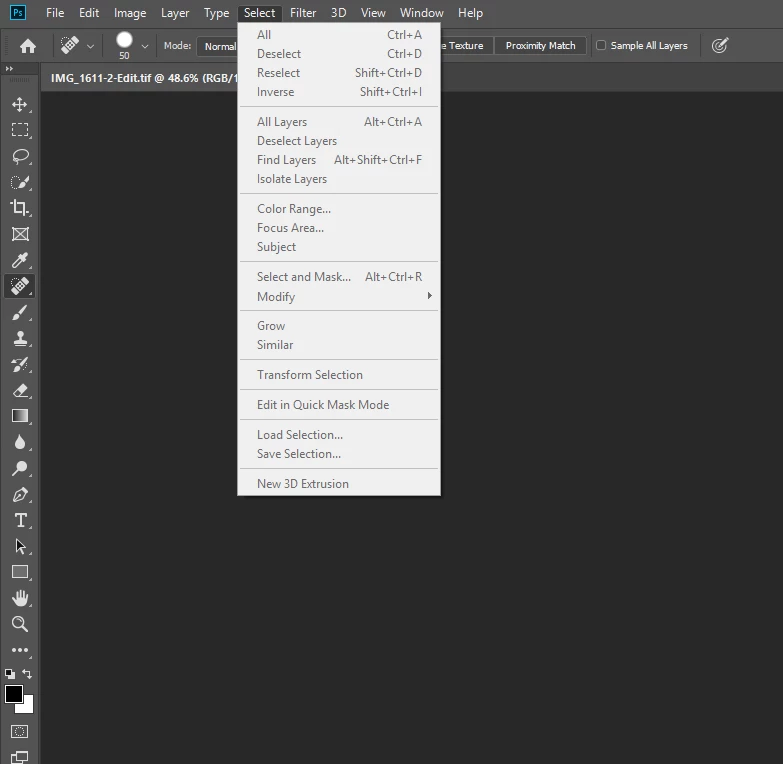
How can I fix my grayed out menu options in Photoshop?

  • December 6, 2018
  • 4 replies
  • 695 views

I am experience this issue in Photoshop CC that I cannot add/remove layers and much more. Essentially all of my menu options are grayed out almost.  This error is only occurring when use the "Edit in Photoshop" Option in Lightroom CC. Whenever I export the file from lightroom CC to a file and then open that file in PS, it works as usual. Is there anything I can do to fix this?  I have uninstalled and reinstalled Lightroom, Photoshop, and Adobe Creative photoshop multiple times and that has not fixed the issue.
This topic has been closed for replies.

4 replies

Maior ADV
Known Participant
December 12, 2018

I have the same problem after updating this morning. when edited in photoshop from LR all menus are deactivated. if you save the file and then run again it works

KR Seals
Community Expert
Community Expert
December 12, 2018

Open photoshop first before sending photo over from LR.

Ken Seals - Nikon Z 9, Z 8, 14mm-800mm. Computer Win 11 Pro, I7-14700K, 64GB, RTX3070TI. Travel machine: 2021 MacBook Pro M1 MAX 64GB. All Adobe apps.
Maior ADV
Known Participant
December 12, 2018

opening first PS it works

D Fosse
Community Expert
Community Expert
December 6, 2018

Known bug. Fix coming.

strl94
Participant
December 6, 2018

Hi, I had the same issue and I have seen somewhere in this forum that,since the last update, you need to launch photoshop before launching lightroom.

If Photoshop was opened first, it works just fine to "Edit in Photoshop" from lightroom.

When I forget and get the issue again, i just close both applications, open photoshop, open lightroom, and continue my work as usual.

Hope this will be fixed with a patch soon

Warren Heaton
Community Expert
Community Expert
December 6, 2018

When using "Edit in Photoshop", is the tif file opening completely?