marjoriek30081318
Participant
September 7, 2024
Answered

How can I get rid of these symbols which came from color select eyedroppers? Mac Sonoma 14.6.1

  • September 7, 2024
  • 2 replies
  • 1424 views

This topic has been closed for replies.
Correct answer Conrad_C

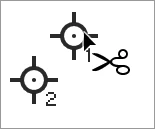
With the Eyedropper tool, hold down the Shift and Option keys, and hover the pointer over the color sampler until the Cut symbol (pair of scissors) appears next to the pointer, then click to delete (cut) that color sampler.


Basically, Shift-clicking the Eyedropper tool adds a color sampler, and Option-Shift-clicking deletes it.
 

2 replies

Stephen Marsh
Community Expert
Community Expert
September 7, 2024

Additionally, with the Color Sampler tool active, there will be a clear all button available in the toolbar.

Conrad_C
Community Expert
Conrad_CCommunity ExpertCorrect answer
Community Expert
September 7, 2024

With the Eyedropper tool, hold down the Shift and Option keys, and hover the pointer over the color sampler until the Cut symbol (pair of scissors) appears next to the pointer, then click to delete (cut) that color sampler.


Basically, Shift-clicking the Eyedropper tool adds a color sampler, and Option-Shift-clicking deletes it.


marjoriek30081318
Participant
September 7, 2024

Thank you!! It was driving me nuts!
